Two former allies argue on a space station.
The roles do not create leverage, the relationship has no exact fracture, the location could be exchanged for any backdrop, and nothing makes a response urgent.
Capability: organize an original scenario around who plays whom and why they must interact. How to start: define both roles, their relationship, a location, and immediate stakes. Expected output: a reviewable five-part brief with opening pressure and distinct response intentions. Limitation: this is a transport handoff only; the visible proof verifies this named capture, not results for every prompt or persistent behavior.
Read across the matrix as a coherence check. Each field should explain why these two people are together, what each can do, and why postponing the exchange would cost something.
| Field | Specific value | Pressure created |
|---|---|---|
| Player role | Rowan — undercover station medic | Can help civilians while hiding another purpose |
| Counterpart | Mara Vale — estranged smuggler partner | Holds the launch key and may know whether the route was sold |
| Relationship | They still care for each other, but trust is broken | Cooperation and suspicion are both credible responses |
| Location | Vesper Station evacuation control | The disputed key and departing shuttle matter in this room |
| Stakes | The final civilian shuttle leaves in five minutes | Rowan cannot wait for complete certainty |
The roles do not create leverage, the relationship has no exact fracture, the location could be exchanged for any backdrop, and nothing makes a response urgent.
They meet in evacuation control as the final civilian shuttle counts down. The setup makes trust, accusation, and bargaining meaningfully different opening intentions.
A meeting context is specific when the people, location, and stakes constrain one another. This editorial check does not claim that the fields were automatically generated.
Rowan can help evacuate civilians; Mara controls access to the disputed launch key.
Evacuation control is where the key and the last shuttle can affect the same decision.
The five-minute countdown prevents either character from waiting for complete certainty.
These original SEELE AI playable captures are the page's unique primary evidence. The opening shows the structured encounter; the second frame shows the visible state after Trust is selected.
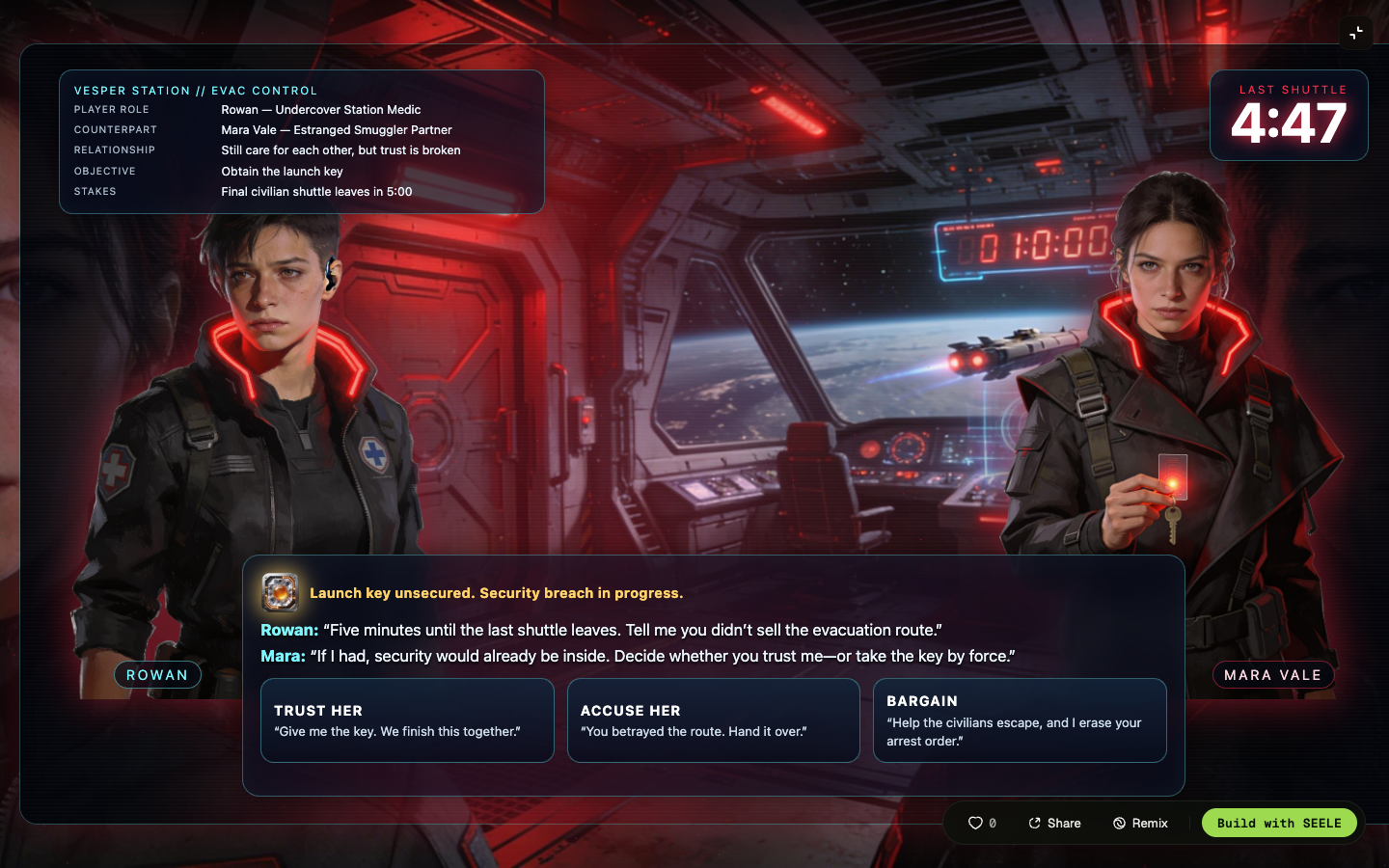
Rowan and Mara Vale, their broken trust, Vesper Station, the launch-key conflict, a five-minute deadline, and three response intentions are visible together.
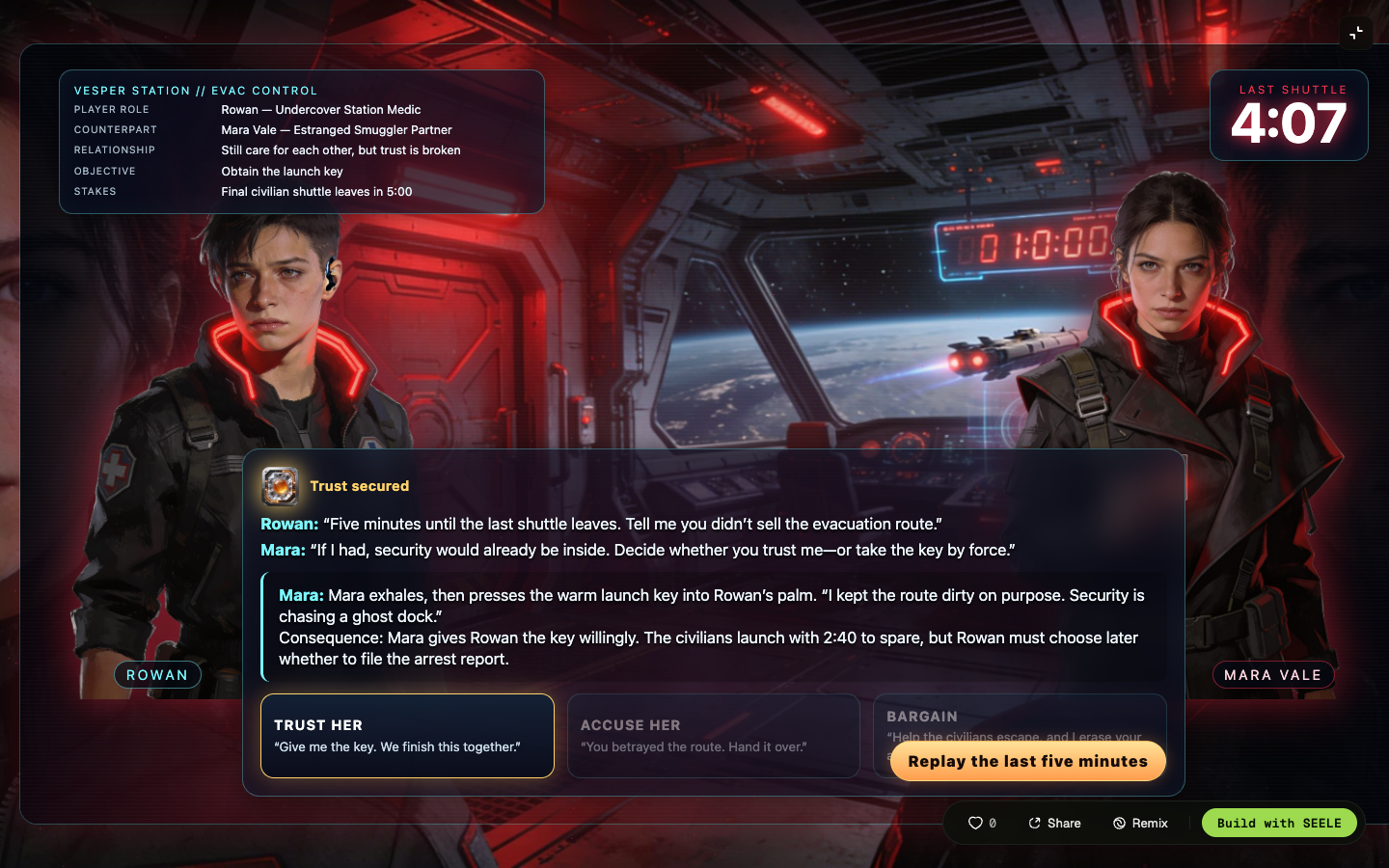
Mara responds, the civilians launch, Rowan faces a later arrest-report choice, Trust is marked secured, and the countdown decreases.
This sequence supports only the visible Trust result in this original scenario. It does not establish how every draft, choice, or later interaction will behave.
Treat each prompt as an editable brief. Keep the six facts connected: both roles, relationship, location, stakes, and the first pressure to answer.
Draft an original roleplay scenario brief where the player is a mountain rescue pilot and the counterpart is a meteorologist who once grounded them after a public dispute. They meet in a storm-locked weather station. A missing climber has ninety minutes before the pass closes, and the counterpart admits the forecast was altered. Open with three response intentions: demand the raw data, trust the revised route, or bargain for radio access.
Draft an original roleplay scenario brief where the player is a new collections auditor and the counterpart is the senior night custodian who protected the player's family years ago. They meet in a sealed museum archive after an unlisted object begins transmitting tomorrow's inventory. Security arrives in twelve minutes. Open with three response intentions: record the anomaly, hide it with the custodian, or ask what happened to the previous auditor.
Draft an original roleplay scenario brief where the player is a habitat mechanic and the counterpart is a rival dive captain whose crew once rescued them. They meet beside a damaged oxygen manifold claimed by both habitats. Pressure will become unsafe in eight minutes. Open with three response intentions: split the remaining supply, challenge the captain's repair plan, or trade access for help evacuating the nursery module.
Draft an original roleplay scenario brief where the player is a town signal keeper and the counterpart is an estranged courier who taught them the lantern code. They meet atop the bell tower during the last night of the festival. A false evacuation signal will send the crowd toward a flooded bridge unless corrected before midnight. Open with three response intentions: believe the courier, accuse them of changing the code, or ask for proof while preparing a counter-signal.
Can a reader tell what each person can do in the scene and why the player is the one being addressed?
Does the shared history change how trust, refusal, or negotiation would feel in this moment?
Do the location and stakes force a timely choice without relying on extra lore?
Do the opening options express different intentions, and can a reviewer identify the visible consequence that should follow each one?
Name the player role and counterpart role, define their relationship, place them somewhere specific, and add a stake that requires an immediate response.
A reviewable brief should include both roles, their relationship, the location, immediate stakes, and the opening pressure or action.
The original Vesper Station playable visibly shows Rowan and Mara Vale, broken trust, a five-minute shuttle deadline, three opening choices, and a separate consequence after Trust is selected.
The link is a transport handoff to Workspace. It does not by itself prove a generated, saved, published, or playable scenario result.
Open the roleplay brief in Workspace and review the handoff there. This transport link does not by itself verify any generated, saved, published, or playable result.