
Seele AI · Create
Unity Endless Runner Game Generator
Move from a broad creation goal to a clearer playable direction faster in Seele AI.
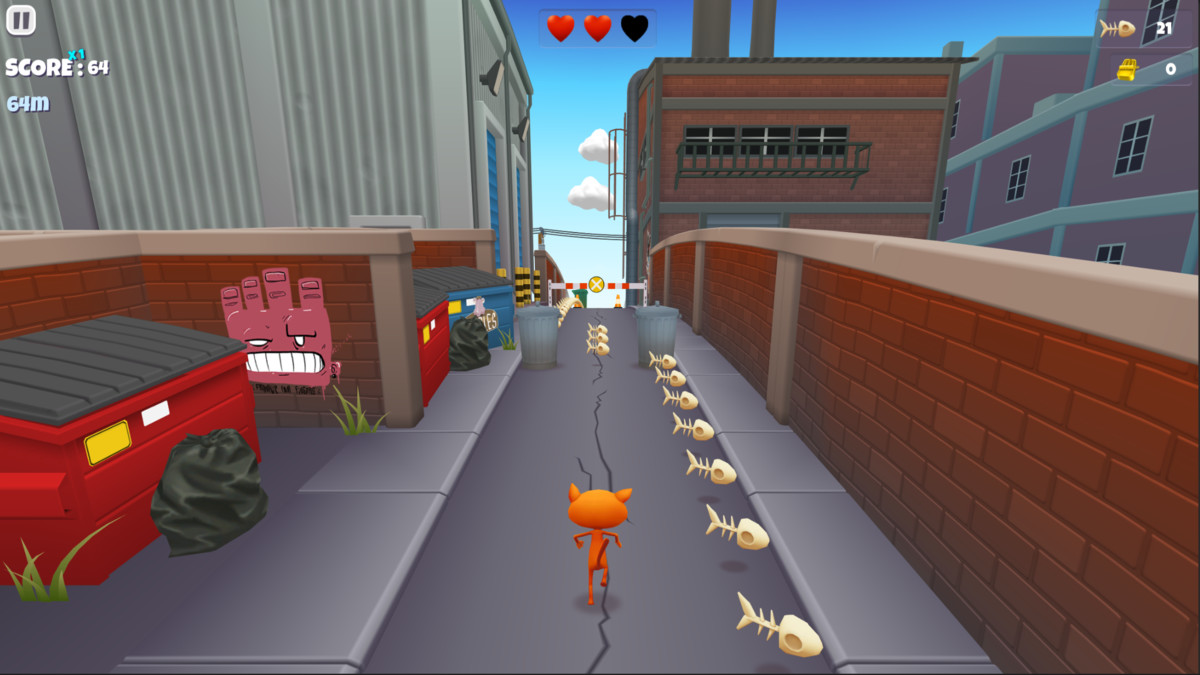
A Unity endless runner game generator turns a plain-language brief into an editable game starting point with automatic forward movement, lane or track switching, hazards, pickups, speed scaling, scoring, combos, restart behavior, device controls, and a Unity scene/prefab handoff. The gameplay proof shown is an authentic screenshot from Unity Technologies’ official Unity Asset Store Endless Runner Sample Game (Trash Dash), used as disclosed reference evidence—not a SEELE output or build, DOM mock, or fake HUD.
The working loop
From Runner Brief To Unity Handoff
Keep locomotion, challenge pacing, controls, and project delivery in one prompt-led build path.
Define The Running Loop
Choose forward motion, lane or track switching, obstacle patterns, pickups, boosts, controls, and the score goal. Seele turns the brief into a structured endless-runner direction with explicit gameplay rules.
Generate And Playtest
Run the prototype and test switching, collisions, pickup timing, speed scaling, scoring, combos, fail states, and restart behavior. The workspace produces an editable starting point for focused iteration.
Refine And Hand Off
Tune spawn fairness, difficulty curves, mobile and desktop input, camera feel, feedback, performance, scene organization, and prefabs. Seele applies revisions while preserving an inspectable project path.
What leaves the page
What The Unity Runner Build Includes
Review movement, progression, and project delivery as separate outputs.
Forward Runner Loop
Automatic forward movement, lane or rail switching, obstacle and hazard collisions, pickups, boosts, fail states, and a quick restart path.
Pacing And Score Systems
Speed scaling, spawn pacing, distance or score progression, combo windows, pickup feedback, and high-score behavior.
Unity Project Handoff
Organized scene objects, reusable prefabs, scripts, input mapping for touch and keyboard, test notes, and an export-ready project path.
Fit and limits
Best For And What Still Needs Review
Best for
- Prototyping lane-based or rail-based Unity endless runners from a focused prompt
- Exploring energy sprint, neon barrier, and night-city arcade variants around one reusable loop
- Testing hazards, pickups, boost timing, score combos, speed curves, restart behavior, and cross-device input
Still needs human review
- Playtest lane switching latency, collision fairness, procedural spawn safety, difficulty curves, boost timing, scoring, combo decay, and restart reliability
- Review generated C# code, Unity version and packages, scene and prefab references, asset rights, input settings, accessibility, performance, save data, analytics, and platform compatibility
- Confirm final art and audio, device-specific controls, build settings, store requirements, export behavior, and production QA before release
Before you start
FAQ
What does a Unity endless runner game generator create?
It creates an editable starting point for a Unity endless runner: automatic forward movement, lane or track switching, obstacle and hazard handling, pickups and boosts, speed scaling, score progression, controls, fail states, and a restartable loop. Treat the output as a prototype that still needs playtesting and code review.
Can one build support lanes and rail switching?
Yes. Specify whether movement snaps among three lanes, follows rails, or uses a hybrid track system. Define switch timing, input buffering, collision width, camera behavior, and how obstacle placement keeps each segment solvable.
How should speed, pickups, boosts, and combos progress?
Start with a readable base speed, then scale difficulty in capped stages or curves. Use pickups for score or energy, reserve boosts for explicit timing windows, and make combo gain and decay visible. Human playtesting should verify fairness at every speed band.
Can the runner work on mobile and desktop?
The brief can require swipe or tap lane changes on mobile plus arrow keys or A/D on desktop. Review gesture thresholds, input buffering, hit targets, safe areas, orientation, keyboard focus, controller needs, accessibility, and frame rate on representative devices.
What does the Unity export handoff include?
Ask for a clearly organized scene, reusable runner, obstacle, pickup, and track prefabs, inspectable C# scripts, input configuration, and build notes. Before publishing, verify references, packages, licenses, build settings, performance, persistence, and target-platform requirements.
Next move
Build Unity Endless Runner Game Generator faster in Seele AI
Turn a rough creation goal into a clearer prompt, direction, and next step inside Seele AI.