
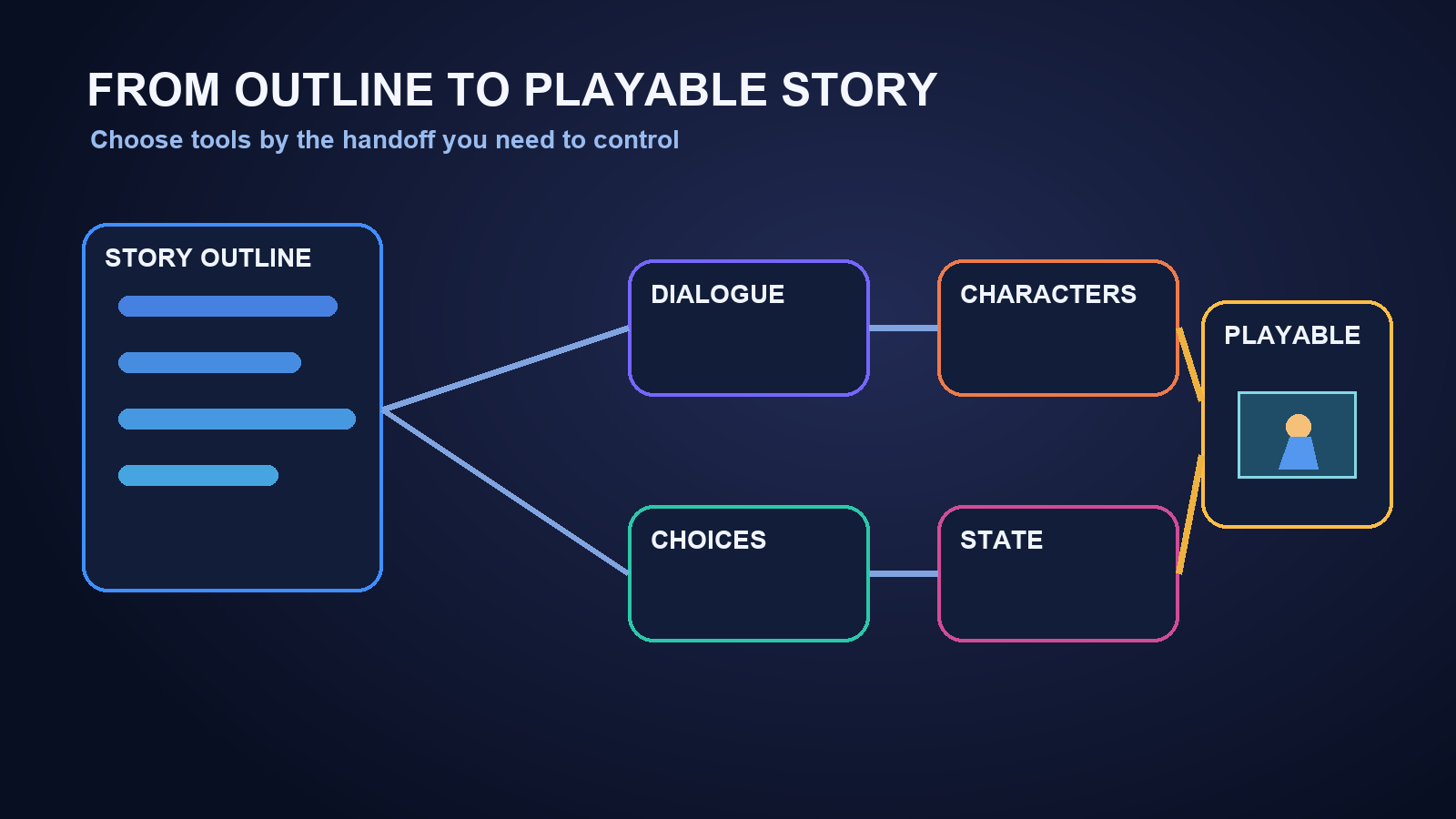
Key takeaways
- Use an AI assistant for story expansion, an explicit branch format for choices and state, and a runtime for playable delivery. Twine suits fast choice maps, Ink suits stateful narrative integration, Ren’Py suits visual novels, and RPG-oriented tools suit explorable scenes. Approve all-in-one AI builders only after editability, persistence, consistency, and export tests pass.
The short answer
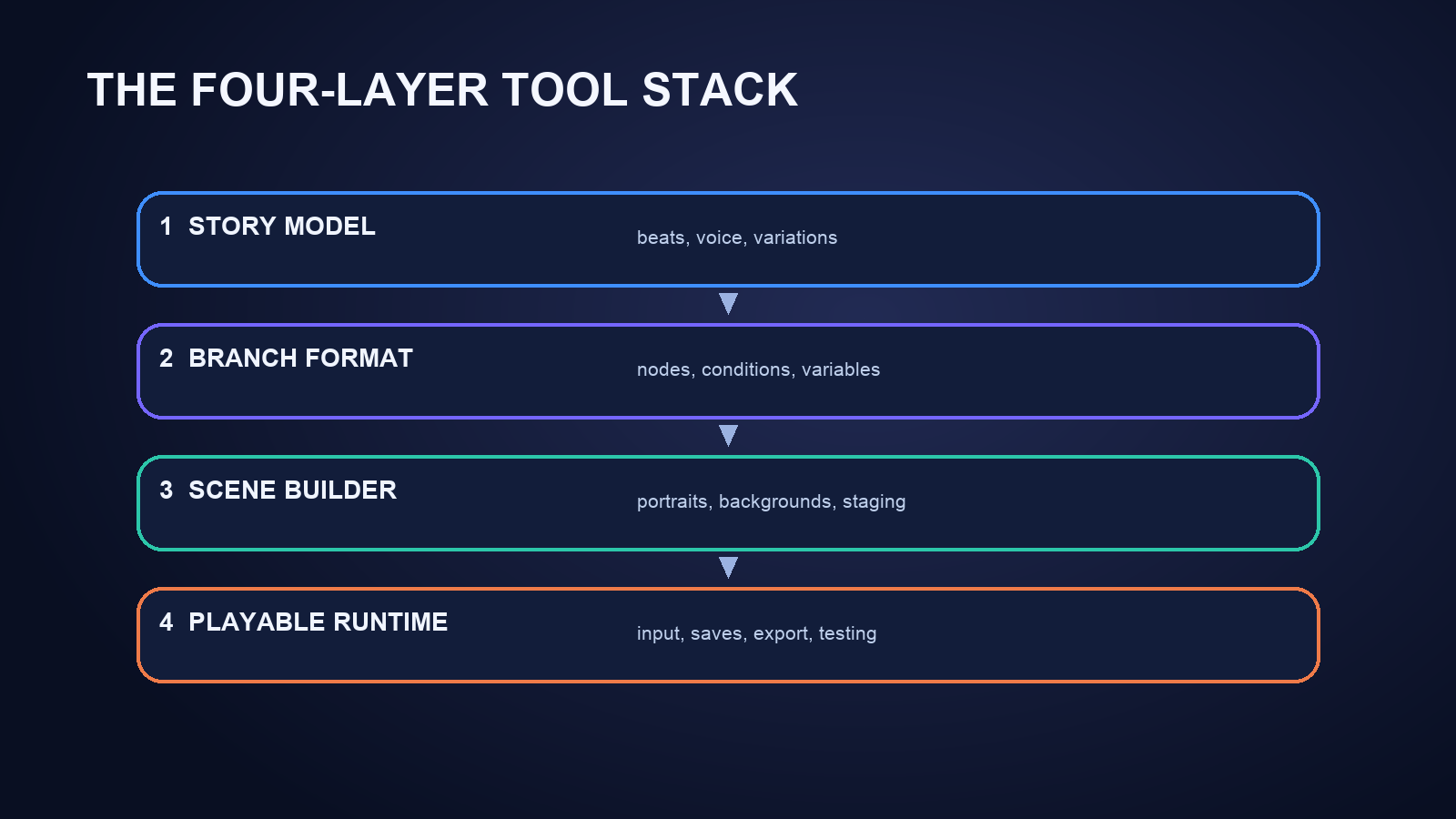
The best setup is usually not one magic app. Use an AI writing model to expand the outline, a branching-story format to hold choices and state, and a scene or game runtime to make the result playable. A general AI assistant can draft dialogue and variations quickly, but it does not automatically give you reliable variables, reachable endings, character art, save behavior, or an exportable game. Tools such as Twine, Ink, Ren’Py, and RPG Maker solve different parts of that production chain; AI-native game builders may combine more of it in one workspace.
For a fast prototype, choose the tool that controls your hardest handoff. Pick Twine when you need a visual choice map, Ink when narrative state and engine integration matter, Ren’Py for a conventional visual novel, and RPG Maker for exploration and RPG systems. Pair any of them with an AI assistant for outlining, dialogue variants, character sheets, and test cases. If you evaluate an all-in-one AI builder, require it to prove editable branches, persistent variables, consistent characters, and a playable export before you commit a full script.
Start by separating four jobs
“Turn my outline into a game” hides four different jobs. Tool comparisons become much clearer when you evaluate each job separately.
Story expansion turns a beat sheet into scenes, dialogue, character goals, optional reactions, and alternate outcomes. Large language models are effective drafting partners here, especially when you provide a story bible and a strict output shape. They still need editorial review for repetition, continuity, pacing, and invented facts.
Branch representation records passages, choices, conditions, variables, and consequences. This is where a document becomes an interactive system. A branch format must preserve identifiers and state; natural-language prose alone is too ambiguous for dependable implementation.
Scene assembly combines dialogue with portraits, backgrounds, music, transitions, maps, encounters, or interaction. Visual novel tools emphasize staged conversations. RPG tools add movement, inventory, combat, and world events. An AI game builder may generate some of these elements, but you should verify which parts remain editable.
Playable delivery covers input, saves, restart behavior, debugging, browser or desktop output, and regression testing. A convincing scene preview is not necessarily a complete runtime. Test the actual share or export path, not only the editor.
This four-layer view also prevents a common mistake: asking one model to produce thousands of lines before deciding how branch state will be stored. Define the target format first, then generate into it.
Which tool category fits your project?
General AI assistants: best for drafting and restructuring
ChatGPT, Claude, Gemini, and similar assistants can turn an outline into scene beats, dialogue alternatives, character profiles, quest descriptions, and structured branch plans. Their main advantage is flexible language work. They can rewrite a scene for a different character voice, propose consequences for a choice, or find branches that seem emotionally redundant.
Use them as a writing layer, not as the only source of game truth. Ask for stable scene IDs, speaker IDs, entry conditions, state changes, and exit destinations. Keep the approved story graph in your own file or authoring tool. On every revision, request a change log rather than accepting a completely regenerated script.
This category is the best fit when you already have a runtime and primarily need writing acceleration. It is a weak fit when you expect the chat response itself to become a tested game without integration work.
Twine: best for quickly mapping choice-driven prototypes
Twine is useful when writers want to see passages and links as a graph and test a browser-based branching flow early. It is especially practical for choice-heavy interactive fiction, pitch prototypes, and narrative design exercises. AI can draft passage content and suggest link structure, while Twine becomes the explicit map you inspect.
The tradeoff is that a large project still needs disciplined naming, variables, reusable logic, and version control. Decide which story format and scripting conventions your project will use before generating a large volume of passages. Treat generated code as code: review it, test it, and keep the smallest possible state model.
Choose Twine if your first milestone is “a reader can make choices and reach distinct endings,” not “a fully staged visual novel or systems-heavy RPG is complete.”
Ink: best for stateful narrative that may connect to a game engine
Ink is designed for branching narrative with variables, conditions, knots, stitches, and reusable flows. It is a strong destination format when the story will eventually live inside a broader game. An AI assistant can help convert scene plans into Ink-like structures, but generated output should be checked by the compiler and by playthrough tests.
Ink rewards authors who think in state transitions rather than pages. Define a compact variable dictionary before drafting: relationship scores, discovered clues, completed promises, faction status, and ending flags. Avoid creating a new Boolean variable for every sentence-level detail. A smaller state model is easier for both humans and AI to reason about.
Choose Ink when narrative logic is the core challenge and you are prepared to handle presentation in another layer. Do not choose it because you expect character art, maps, animation, or RPG mechanics to appear automatically.
Ren’Py: best for visual novels with staged dialogue
Ren’Py is a natural target for projects built around character sprites, backgrounds, dialogue, choices, music, and visual-novel presentation. AI can prepare character bibles, scene scripts, emotion tags, asset lists, and first-pass dialogue. The author still needs to connect real assets, direct scene changes, and test every label and menu path.
A safe workflow is to generate one scene at a time in a constrained template. Require a scene label, participating characters, required assets, dialogue, choices, state updates, and a list of valid next labels. Run the scene, check portrait and audio changes, then approve it before generating the next group.
Choose Ren’Py when the experience is primarily a visual novel. If the design depends on free movement, equipment, tactical combat, or a large explorable world, a broader engine may be a better runtime.
RPG Maker and general game engines: best when story must coexist with RPG systems
RPG Maker can be a practical destination for event-driven stories with maps, NPCs, switches, variables, inventory, and combat. AI assistance is useful for quest outlines, NPC dialogue, item descriptions, event pseudocode, and test matrices. It cannot remove the need to wire events correctly or balance the underlying game.
General engines provide even more control, but they demand more implementation work. Use them when the playable scene includes mechanics that a narrative-first tool cannot represent cleanly. Keep generated dialogue and narrative state separate from movement, combat, and economy logic so a story rewrite does not silently break systems.
Choose this category when “playable scene” means walking, interacting, collecting, fighting, or solving spatial problems—not merely advancing dialogue.
All-in-one AI game builders: best for rapid vertical slices, if they pass a control test
AI-native builders may combine prompting, asset creation, scene assembly, and a playable preview. That can shorten the path from an outline to a vertical slice. The important question is not how impressive the first generation looks; it is how safely you can revise it.
Before selecting one, verify that you can inspect and edit branch logic, keep character identity consistent, change one scene without replacing unrelated work, preserve variables across scenes, recover an earlier version, and share or export the result. Also inspect current rights, privacy, collaboration, and commercial-use terms for every generated or uploaded asset.
This category fits exploratory prototypes and creators who value speed over low-level control. If the project requires exact code ownership, deterministic builds, custom systems, or a long production lifetime, pair the builder with an exportable source-of-truth workflow or choose a conventional runtime.
A practical outline-to-branch workflow
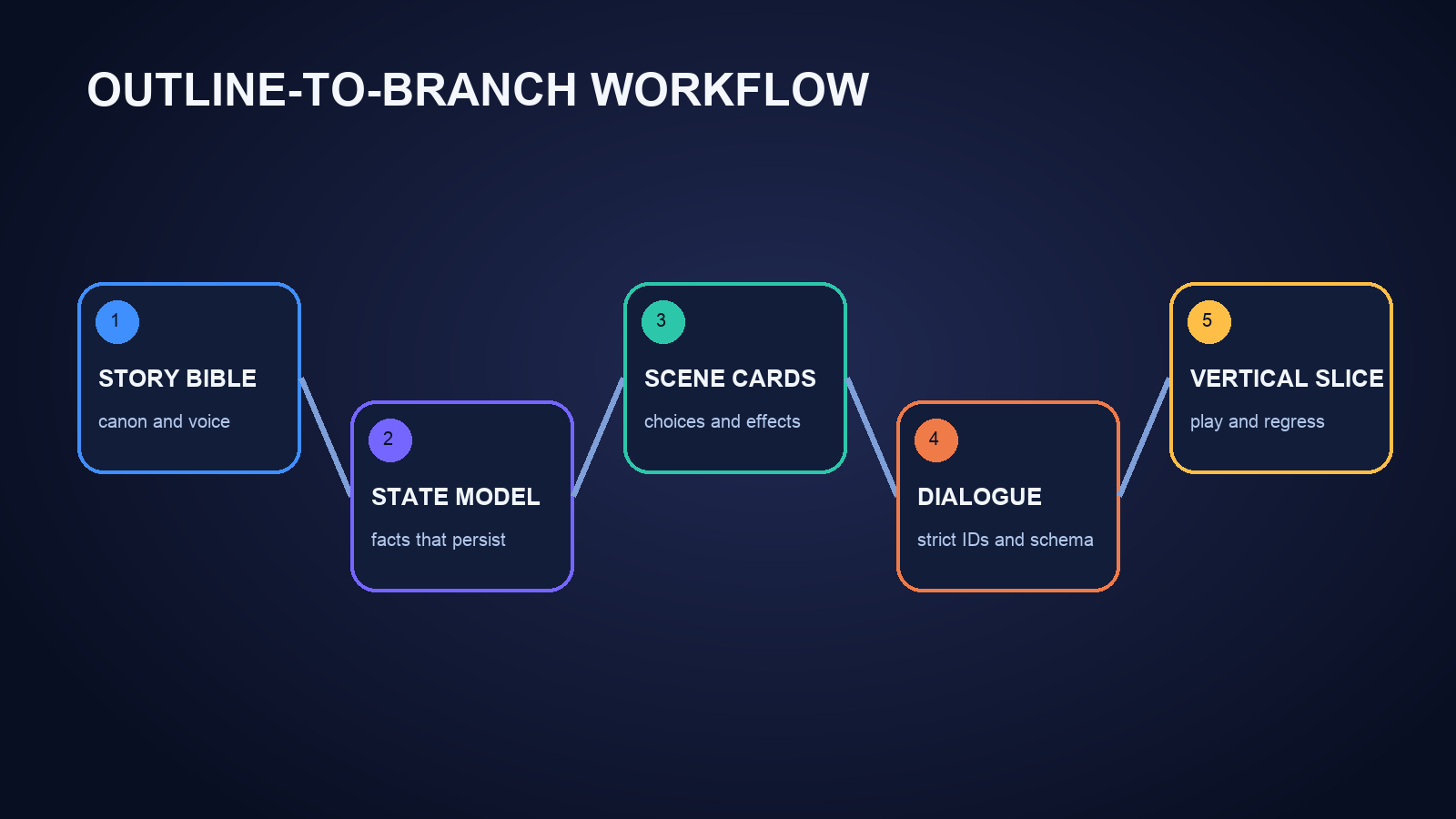
1. Freeze a one-page story bible
Record the premise, audience, tone, point of view, character goals, setting rules, prohibited content, and ending promise. Give every recurring character a stable ID. Put facts that must never change in a short “canon” block. The AI should quote the relevant canon IDs when it drafts a scene.
2. Design the state model before the dialogue
List only variables that affect later content. For a small mystery, you might track trust, whether the player found a key, which suspect was confronted, and one ending flag. State names should describe facts, not vague emotions. Define who changes each variable and where it is read.
3. Generate a branch skeleton
Ask for scene cards before prose. Each card should include an entry condition, player goal, conflict, available choices, state changes, and next scene IDs. Review reachability and scope. Merge choices that lead to the same consequence unless the wording itself delivers meaningful role-play.
4. Draft dialogue into a strict schema
For every line, keep a speaker, text, optional emotion, and any condition. For every choice, keep the player-facing text, condition, effects, and destination. Do not let the model invent new IDs silently. Reject output that references an undefined character, variable, asset, or scene.
5. Assemble one vertical slice
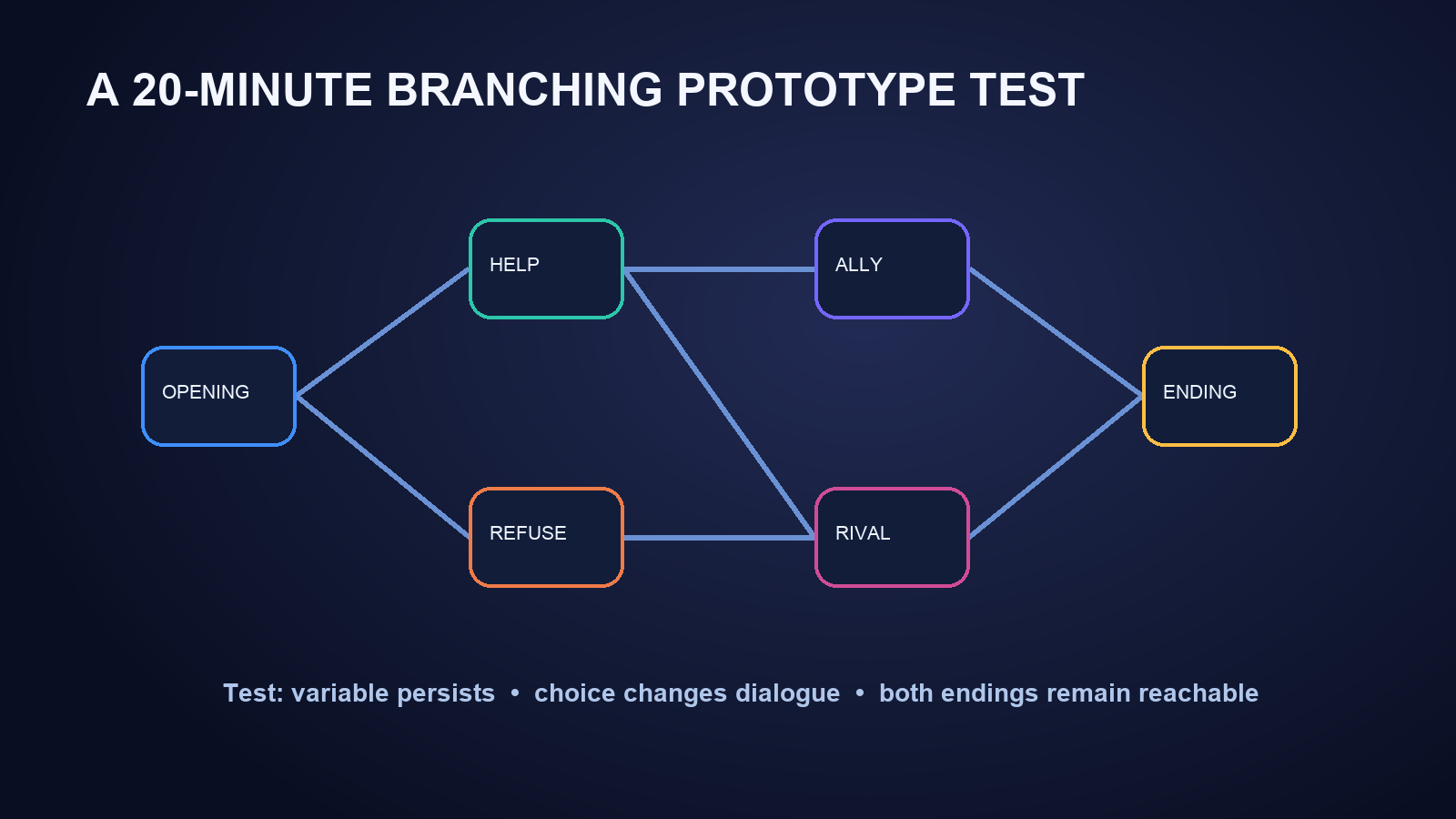
Build an opening, one meaningful choice, two consequence scenes, and at least two reachable endings. Add only the art and audio needed to judge tone and continuity. This slice is large enough to expose broken state and small enough to rebuild.
6. Run branch-aware tests
Test every choice, not only the preferred route. Confirm that variables persist after saves and scene changes, unavailable choices remain unavailable, both endings can be reached, and restarting clears the intended state. Ask an AI assistant to propose test paths, but record the real result from the runtime.
Use a 20-minute tool audition
Give each candidate tool the same small brief: two characters, one location, a disagreement, one hidden fact, one choice, and two endings. Time-box setup and judge the output with six questions.
- Can you inspect the complete branch graph or source?
- Can you rename a variable without hunting through generated prose?
- Can you revise one character’s voice without changing the plot?
- Can you replace a portrait, background, or line independently?
- Can you play both endings from a clean start?
- Can you export or preserve the project in a form you control?
Reject a tool that hides the branch model behind a polished preview. For interactive storytelling, editability and state integrity matter more than the number of assets produced in the first minute.
Common failure modes
Branch explosion happens when every choice creates a permanently separate storyline. Use reconvergence, delayed consequences, and state-based variations to preserve agency without multiplying production beyond control.
Character drift appears when the model forgets voice, relationships, knowledge, or visual traits. Ground every scene in the compact story bible and review character-specific continuity separately from grammar.
Invalid destinations occur when generated choices point to missing scenes or renamed labels. Validate IDs automatically whenever the format allows it, then perform a clean playthrough.
Decorative choices offer different wording but no meaningful reaction. A choice can change plot, information, relationship, resources, tone, or role-play identity; make the intended consequence explicit in the scene card.
Beautiful but uneditable output is common in fast generators. Test a difficult revision before approving the tool: move a reveal to another branch, preserve all earlier choices, and confirm that unrelated scenes remain unchanged.
The decision rule
Choose the smallest stack that gives you reliable control. A general AI assistant plus Twine is often enough for a choice prototype. Pair an AI assistant with Ink when you need rigorous narrative state, with Ren’Py when visual-novel staging is central, or with an RPG-oriented runtime when movement and systems define the scene. Consider an all-in-one AI builder when speed matters, but approve it only after the branch, character, revision, and export tests pass.
The winning tool is not the one that writes the most dialogue. It is the one that lets you trace every choice from the outline, change it without collateral damage, and verify the result in a playable build.
Frequently Asked Questions
Can one AI tool turn an outline directly into a complete branching game?
Some tools can generate a playable prototype from a prompt, but completeness and control vary. Verify branch visibility, persistent state, character consistency, independent asset editing, saves, and export. For durable projects, a writing model plus an explicit branching format and runtime is usually easier to audit.
What is the easiest tool for a first interactive story prototype?
Twine is often a practical first choice for a passage-and-choice prototype because the branch map is visible and the result can be tested quickly. Pair it with an AI assistant for drafts, then keep passage names, variables, and destinations under human control.
Should I use Ink or Ren’Py for a branching visual novel?
Use Ink when reusable narrative logic and state are the main problem, especially if presentation will live in another engine. Use Ren’Py when sprites, backgrounds, dialogue, choices, music, and conventional visual-novel staging are the main experience.
Can AI generate consistent characters across many scenes?
It can help, but consistency is not automatic. Maintain a compact character bible with stable IDs, voice rules, knowledge boundaries, relationships, and visual traits. Review each scene against that source and test revisions on a small slice before scaling.
How do I stop branching dialogue from becoming too large?
Use meaningful state variables, reconverge branches after consequences, reserve fully separate routes for major decisions, and vary later dialogue based on remembered state. Plan scene cards before prose so duplicate branches are visible early.
What should I test before committing to an AI game builder?
Build the same tiny story in each candidate: one choice, two consequence scenes, and two endings. Confirm you can inspect logic, edit one branch, preserve variables, replace an asset, restore a version, reach both endings from a clean start, and retain or export the project.


