A character can look consistent in two portraits and still become someone else while walking. For a playable character, identity has to survive new views, changing poses, looping frames, and the scale at which the player actually sees it. Start with one approved design, expand only the poses you need, and check each animation in the game before requesting more assets. This illustrative workflow follows Pip, an original little courier with a teal coat and a left-hip messenger bag. It explains what to request, what to compare, and how to distinguish an artwork problem from an animation-state problem. The frame counts and scene rules are proposed practice specifications, not universal standards. Treat generated variations as candidates for approval rather than proof that consistency is automatic.
1. Make one identity card the authority
Define Pip once: rounded cream face, two dark oval eyes, short navy bob, teal hooded coat with a triangular hem, rust-orange boots, and mustard messenger bag at the anatomical left hip. Add the proportions visible in your approved original reference: head-to-body relationship, limb thickness, and overall height. Keep these fixed while changing the pose. If no reference exists yet, approve a neutral full-body design before requesting animation.
Ask for front, side, and back proposals at matching scale with a plain background. Hidden details are design decisions to approve, not established facts. Follow the bag strap around the body, inspect the coat hem from each direction, and decide how much face is visible in profile. Correct contradictions in this small set before producing a larger sheet.
2. Separate a new pose from a new design
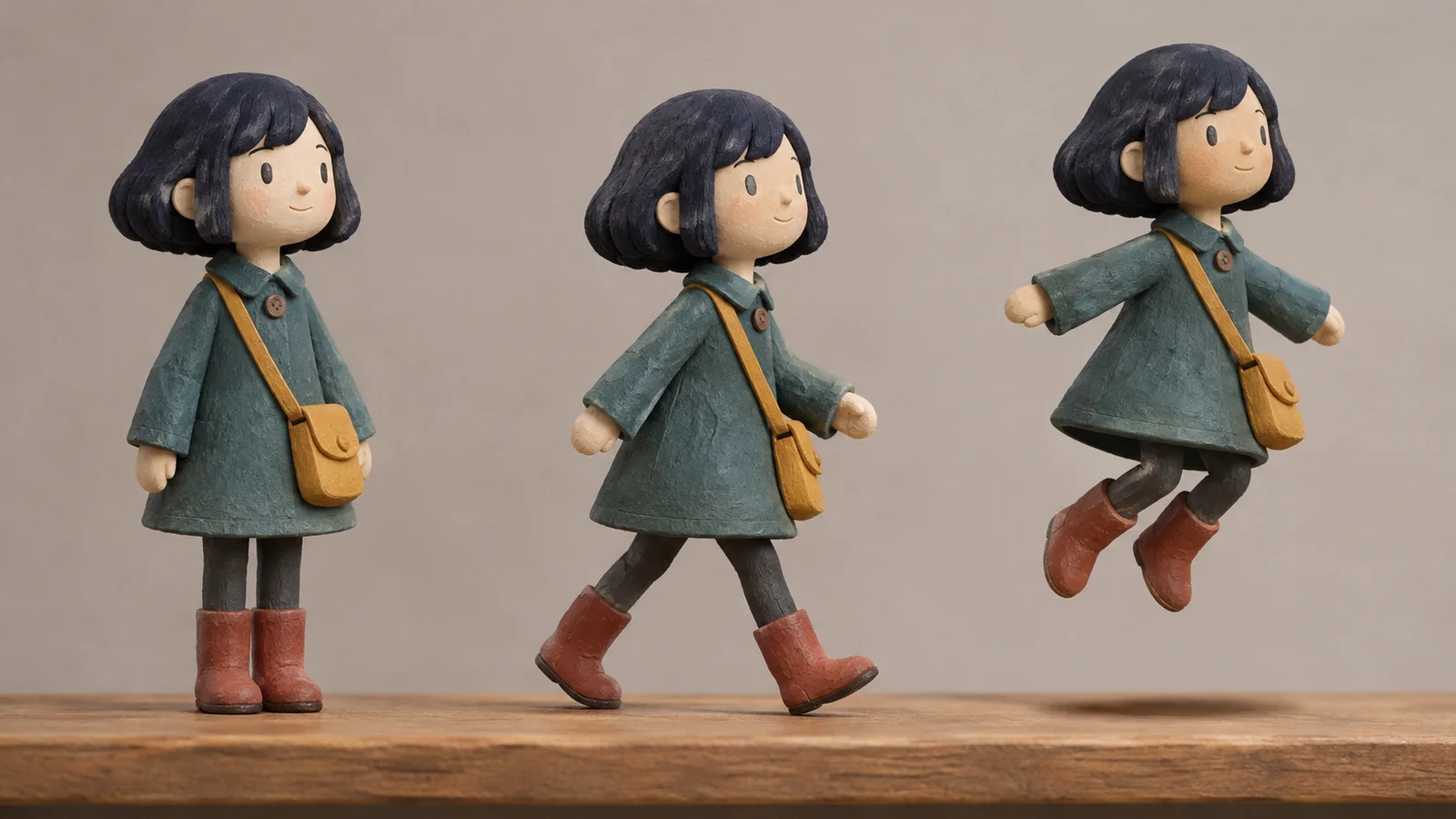
For a side-view delivery game, request only the poses that serve that view: neutral idle, walking contact, walking passing, takeoff, airborne travel, and landing. Front and back references explain the character but do not require additional playable directions. Use a consistent camera and lighting so those changes do not disguise proportion drift.
Using the approved original Pip reference, prepare side-view pose candidates for idle, walking contact, walking passing, jump takeoff, airborne travel, and landing. Preserve the cream face, oval eyes, navy bob, teal triangular-hem coat, rust-orange boots, and mustard bag at the anatomical left hip. Keep body scale consistent. Use a proposed 128-by-128 transparent frame with a common standing-foot baseline and room for jumping. Do not add costume details or accessories. Keep individual source poses available for review.Treat the requested dimensions as a prototype target. If the chosen asset workflow needs cropping, cleanup, or resizing, keep that work separate and inspect the result again. Compare each pose beside the approved design: the coat can fold and the limbs can bend, but Pip should not gain a different face, taller body, or extra bag.
3. Align frames before making the movement smoother
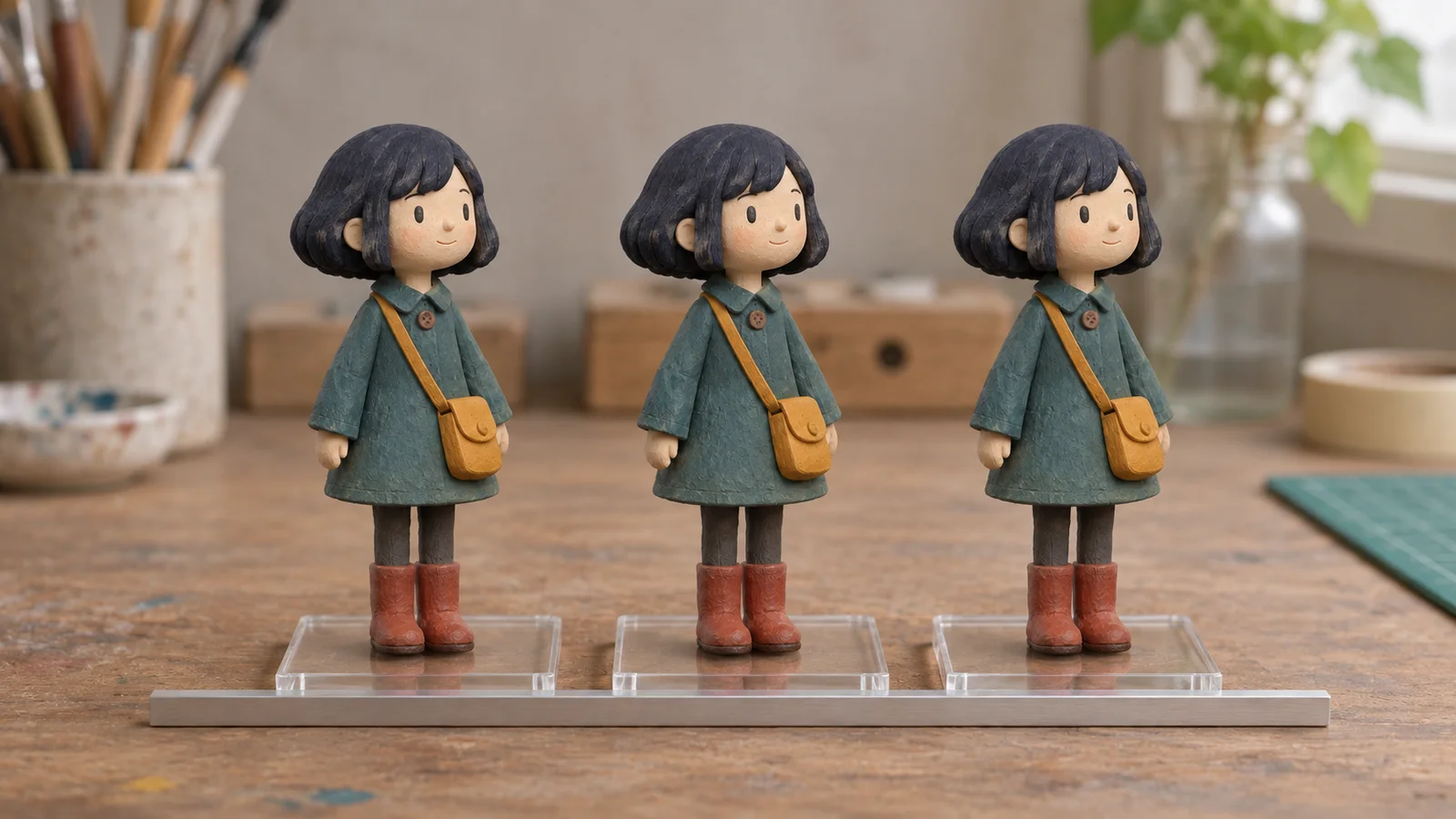
Use equal canvas sizes and a common pivot, such as bottom center, for the standing and walking frames. Leave enough empty space for raised arms and jumping without shrinking the character. Preview transparency on both light and dark backgrounds to find unwanted edges. Do not crop every pose tightly and then expect identical placement automatically.
Check a small contact-and-passing sequence before requesting in-between frames. If Pip jumps vertically while walking, compare foot baselines and pivots first. If the bag changes shape, revise that artwork against the reference. More frames will not correct a misaligned pivot or an inconsistent coat. Preserve the last accepted poses so a repair does not force you to start over.
4. Assemble idle, walk, and jump as separate clips
For practice, aim for four idle frames, six walk frames, and three jump poses: takeoff, airborne, and landing. These small targets keep inspection manageable; they are not a claim about automatic animation export. Start with idle. Pip may breathe or shift weight, but the face, body scale, and costume should remain stable.
Next, play the walking loop slowly and at intended speed. Inspect the seam from its last frame back to its first. The boots should not flash a different color and the bag should not vanish. Review the jump as a change of pose rather than a new silhouette: deliberate stretch can work, but a different head or coat does not become consistent simply because the frame passes quickly. Revise a rejected frame before polishing timing.
5. Put the same Pip into one small delivery scene
Use a flat side-view route with one low crate, three letters, and a mailbox. Left and Right move Pip; Space jumps only while grounded. Collect all letters and touch the mailbox within 30 seconds, starting the timer on first movement. An early mailbox contact explains how many letters remain. Restart restores the letters, player, timer, and outcome state.
Connect the animation rules explicitly: idle when grounded and still, walk when grounded and moving, and jump while airborne. Landing returns to the appropriate grounded clip. Keep the collision shape stable even when the drawn bag or arm extends beyond it. Review Pip at actual play size, then check a complete delivery, timeout, early mailbox contact, and restart after both endings.
6. Diagnose identity drift separately from controller faults
A changing face or coat is an asset problem. A correct jump pose that remains after landing suggests an animation-state transition problem. Walking while stationary suggests the movement condition is wrong. Vertical bobbing may come from pivots or baselines. Name the failed pose or input sequence so you can change the responsible part instead of regenerating the whole character.
Pip’s asymmetrical bag needs a deliberate facing rule. Mirroring a right-facing sprite moves the bag to the other anatomical side. You can accept that shortcut for a prototype, but do not call it exact identity preservation. If the bag must stay left, approve separate directional artwork. Make this choice before expanding the animation set so the same decision carries through every clip.
Where SEELE fits into the asset-to-game handoff
SEELE describes natural-language creation involving game assets, scenes, and gameplay code. For this workflow, the relevant inputs are the approved Pip design, accepted poses, and the small delivery brief. The intended output is a playable scene using that same character, not merely another attractive portrait. Confirm how the current workflow accepts assets and represents animation before relying on a specific import or packing method.
Preserve the accepted source images and pose decisions independently of the project. When a gameplay revision changes appearance, compare it against those references and request a bounded correction. Product positioning does not guarantee that a particular sprite format, pivot arrangement, or animation setup will transfer without cleanup. Check the actual handoff, then evaluate identity and animation again in the resulting scene.
Conclusion: Approve the character at every handoff
Consistency comes from keeping a small set of identity decisions intact while the character changes pose, frame, and gameplay state. Approve Pip’s reference first, fix alignment before adding frames, and separate costume drift from controller mistakes. A matching sheet alone is not enough if the character changes at the walking-loop seam or after landing. For your next step, use the approved original design and the small delivery brief in SEELE, confirming the available asset workflow before expanding it. Review one clip at actual play size, correct the specific failure you can see, and keep the last accepted character assets available.
Character consistency at each handoff
This matrix organizes the article’s proposed checks. It is not a report of a completed test.
| Stage | Compare against the approved reference | Common failure to investigate |
|---|---|---|
| Identity card | Face, hair, coat, boots, bag position, and silhouette. | A new pose changes the character design rather than only the pose. |
| Animation frames | Proportions, alignment, and placement between frames. | Visible jitter, changing accessories, or inconsistent scale. |
| Idle, walk, and jump clips | The same identity and readable transitions across separate clips. | A missing frame or incorrect state makes the character appear to change. |
| Playable scene | Recognition at gameplay scale while the controller runs. | Distinguish artwork drift from an input or animation-state fault. |
Frequently asked questions
Do I need dozens of reference images for a consistent character?
No. Begin with one approved original design and a small set of mutually consistent views. Add a reference when it resolves a real ambiguity, such as strap placement or coat shape in profile. More images can make decisions harder if they conflict, so correct disagreements before using the set to request new poses.
Can I mirror a walking animation for both directions?
You can if you accept the visual compromise. Pip’s left-hip bag makes simple mirroring change an identity detail. For a rough prototype, that may be acceptable; for anatomical consistency, prepare separately approved directional artwork. Decide explicitly and apply the same rule to idle, walking, jumping, and any later character actions.
Does a consistent character sheet mean the assets are ready to sell?
No. Visual consistency does not establish rights, file quality, engine compatibility, or suitability for a particular release. Check reference permissions and the current tool terms, then inspect the actual animation and game integration. Keep those questions separate so an attractive approved sheet does not stand in for a complete asset handoff.