A warehouse-management game becomes easier to design when one shift has a visible start, a handful of stock locations, and deadlines that fit on a small action clock. Begin with a player who assigns a storage bay, receives a carton, puts it away, picks an order, and dispatches it. Then write down the state after every action so a late order has a cause you can point to.
This tutorial uses Bluegate Fulfillment, an original fictional warehouse, to hand-calculate a six-tick shift. The example shows how one pre-shift bay assignment changes the paper result from one on-time order to two. It is a manual design exercise only: no prompt was run, no playable game was built, and no warehouse or playtest data is available.
Choose a one-shift warehouse scope
Start with a question small enough to answer in one play session: can the player move two orders through receiving, storage, picking, and dispatch before their due ticks? A compact shift exposes the core loop without requiring a city economy, worker progression, or a sprawling inventory catalog.
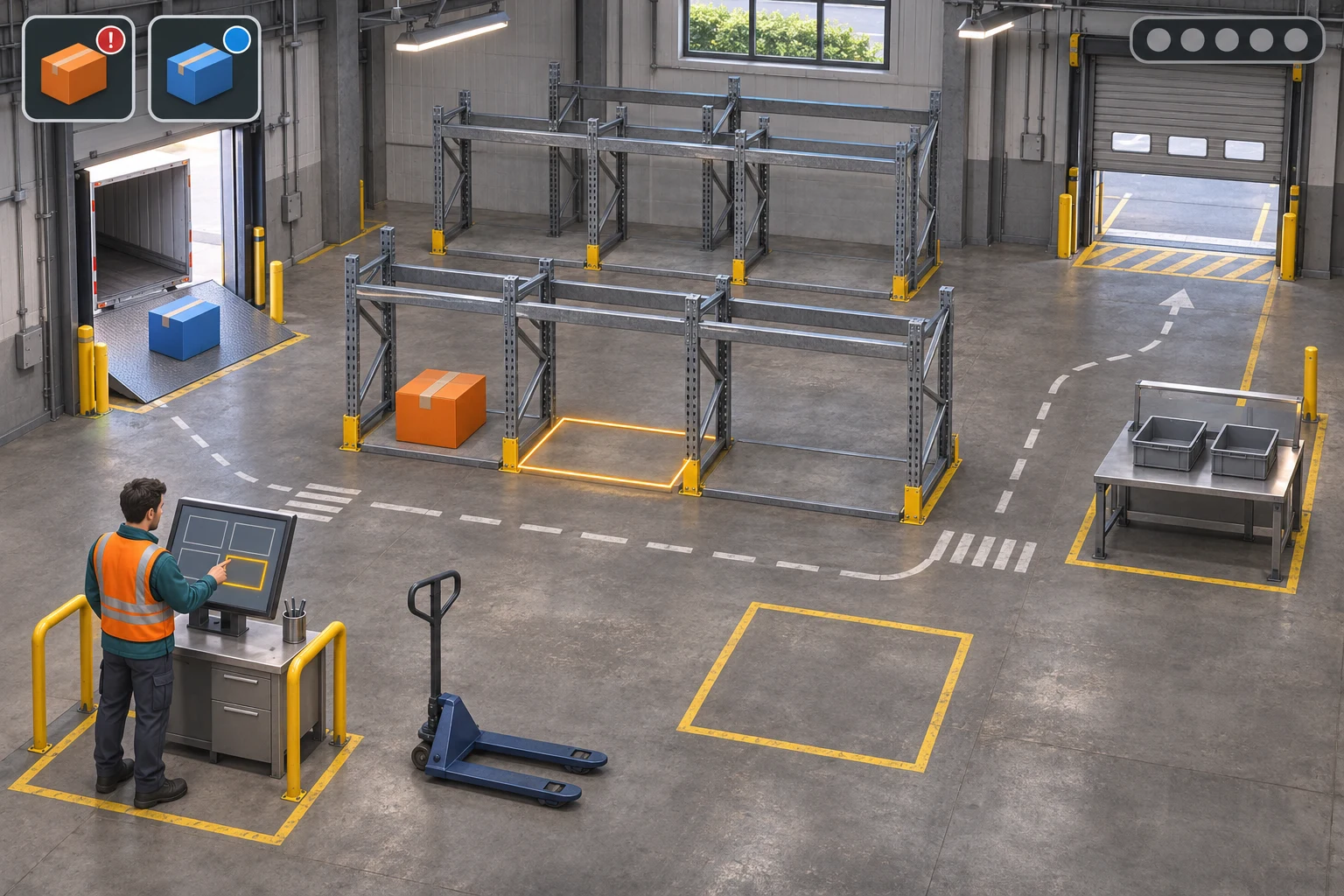
Bluegate Fulfillment has an inbound dock, one floor staging square, two one-unit rack bays, an order-tote position, and a separate outbound gate. Bay A starts with one orange A unit. The second, flexible bay is empty and unassigned. One blue B carton waits at receiving. The Rush order needs A by the end of tick 2; Standard needs B by tick 6. Deadlines are inclusive: dispatching at the due tick counts as on time.
Workers do not have individual travel paths in this first model. Each operation takes one tick, which makes the schedule easy to audit. That abstraction is a deliberate design choice, not a claim about how a real fulfillment center works. You can add aisle distance or staff capacity later, after the basic stock-and-order loop is clear.
| Element | Starting state | Design purpose |
|---|---|---|
| A bay | Capacity 1; contains 1 orange A | Supplies the short-deadline Rush order |
| Flex bay | Capacity 1; empty and unassigned | Creates one slotting decision before the shift |
| Inbound dock | One blue B carton waiting | Starts the receiving flow |
| Staging | One floor slot, initially empty | Temporarily holds the received carton |
| Orders | Rush A due t2; Standard B due t6 | Makes urgency and the longer task chain visible |
| Shift clock | Six action ticks | Provides a bounded schedule and end condition |
Keep the first version single-shift and deterministic. There are no random arrivals, spoilage, traffic jams, worker skills, competing firms, market events, or replenishment rules. Those could all be separate design projects. For now, the reader should be able to answer three questions from the screen: where is each unit, what action can move it, and how many ticks remain before dispatch?
Define storage and order state
Before drawing a map or asking an AI tool for a prototype, choose the smallest state tuple that makes the rules testable. For this game, track current tick, the A-bay contents, flex-bay assignment and contents, staging contents, inbound contents, each order tote, each order deadline, and each order's delivery status. The score is the number of orders dispatched on time when the sixth action resolves.
Inventory and order state should remain separate. Receiving B does not make it pickable; the carton must be put away into a bay assigned to B. Picking then moves one unit from its rack bay into the matching order tote. Dispatch is a separate action that requires a complete tote. This prevents one vague “fulfill order” command from hiding several state changes and deadline costs.
| Action | Precondition | State change and cost |
|---|---|---|
| Assign flex bay | Before the shift starts | Set its allowed SKU to A, B, or unassigned; no tick cost |
| Receive | Inbound carton exists and staging is empty | Move one carton from dock to staging; consume 1 tick |
| Put away | Staging has a carton and a matching assigned bay has capacity | Move that unit from staging to its bay; consume 1 tick |
| Pick | Matching rack bay has stock and order tote needs that SKU | Move one unit from rack to its matching tote; consume 1 tick |
| Dispatch | Order tote is complete | Send one tote through the outbound gate; consume 1 tick |
| Wait | Any unfinished shift | No state changes; consume 1 tick |
For this fictional design, an invalid task consumes a tick but changes no inventory or location. A failed put-away therefore costs schedule time: the carton remains in staging. Staging can hold only one carton, so another receive cannot happen until the first is put away. Picking directly from staging is prohibited. State these edge cases before implementation; otherwise a prototype may quietly invent shortcuts that make its results impossible to compare with the design.
Keep action resolution consistent. Check the action’s preconditions, apply its one state transition, advance the tick, then compare the dispatch timing with the due tick. An order dispatched on or before its deadline receives one point; an unfinished or late order receives none when tick 6 closes. Restart should restore the selected version’s initial assignment, stock, carton, staging slot, orders, tick, and score.
Assign the flex bay and run receiving
Now choose the one variable that the example will change. Version 0 leaves the flex bay unassigned. Version 1 assigns it to B before the shift. Do not also change the deadlines, action costs, stock quantities, or clock. Holding everything else constant makes the difference interpretable.
In Version 0, the player first picks A into the Rush tote, then dispatches it on tick 2. That is on time. B is received at tick 3 and occupies staging. On tick 4, put-away is blocked because no bay accepts B. The failure leaves the carton in staging but still consumes the action tick. There is no legal way to pick it directly from staging, so Standard cannot be completed within the remaining schedule.
In Version 1, assigning the flex bay to B gives the incoming carton a valid destination. The same dock, staging slot, order deadlines, and action costs apply. Receive moves B to staging at tick 3; put-away moves it into the assigned bay at tick 4 and frees staging. The remaining two actions pick and dispatch Standard by tick 6. The earlier Rush order was already dispatched on time at tick 2.
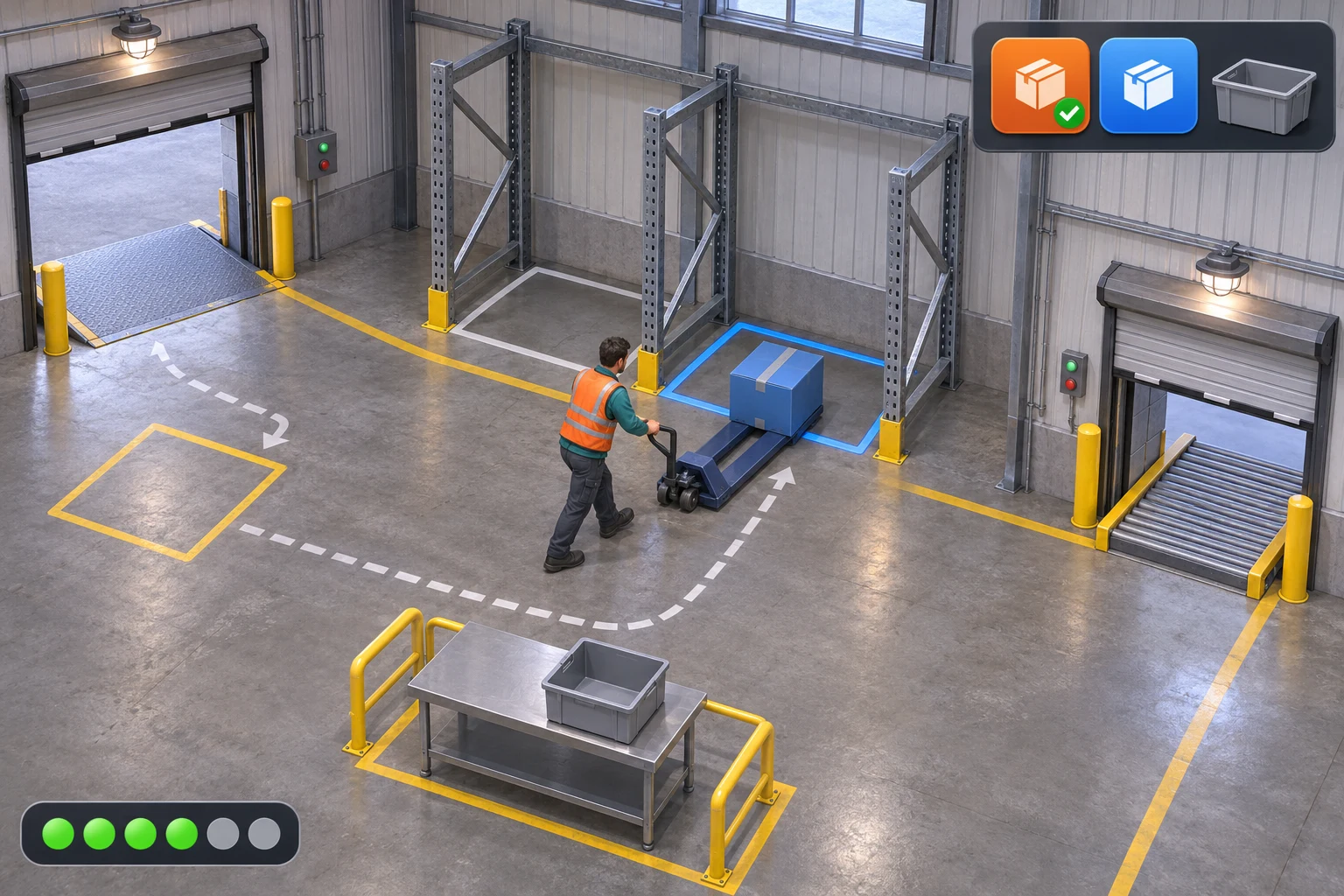
The mechanism image is a concept rendering of that particular board state: one blue B carton is being put away into the floor-level bay, the Rush marker is already complete, and the Standard order remains open. It is not a photograph of a warehouse or a screenshot of a generated game. Keeping the illustration to one active carton also makes the assignment decision easier to read.
Schedule picks and dispatches before the due ticks
Deadlines make action order matter. The Rush order is due at tick 2, so the schedule must spend the first two ticks on pick A and dispatch Rush. Delaying either action means losing that point. Standard has a longer chain: receive, put away, pick, and dispatch B. With the six-tick shift, that chain has exactly four actions available after Rush leaves.
The order tote is not a shortcut around storage. The game requires the unit to be in the correct rack bay before the player can pick it. That distinction makes the put-away rule visible and makes the flex-bay setup meaningful. If a player attempts to put away B with no B bay, the error message should say why it is blocked and preserve B in staging; do not silently discard the carton or mark the task complete.
The model intentionally compresses walking into the one-tick cost. If you later add route distance, do it as a new, explicit rule: for instance, charge one movement action between named zones. Then recalculate both order schedules. Avoid adding hidden travel costs after showing a hand trace, because a reader cannot tell whether an order missed due to slotting or an unannounced movement rule.
Also decide how the interface communicates time. A six-pip clock can show the actions spent without requiring small text. Give the player direct feedback after each operation: inbound count changes after receive, staging clears after put-away, rack stock changes after pick, and an order marker changes only after a valid dispatch. Use a different cue for blocked work so it is not confused with a successful move.
Hand-check the V0-to-V1 shift
Write the trace before you build. Each row below uses one action and records where the units and order state end up. In Version 0 the failed put-away consumes tick 4; in Version 1 the single changed bay assignment allows that action to succeed. Neither schedule has hidden movement actions.
| Version / tick | Action | A bay | B flex bay | Staging | Order result |
|---|---|---|---|---|---|
| V0 start | Flex bay unassigned | A=1 | Unavailable | Empty | Rush due 2; Standard due 6 |
| V0 t1 | Pick A into Rush tote | A=0 | Unavailable | Empty | Rush tote=1 |
| V0 t2 | Dispatch Rush | A=0 | Unavailable | Empty | Rush on time; score 1 |
| V0 t3 | Receive B | A=0 | Unavailable | B=1 | Standard waits |
| V0 t4 | Attempt put-away | A=0 | Unavailable | B=1 | Blocked, but tick is spent |
| V0 t5–t6 | Wait; shift closes | A=0 | Unavailable | B=1 | Standard late; score 1/2 |
| V1 setup | Assign flex bay to B | A=1 | B capacity=1 | Empty | Only changed variable |
| V1 t1 | Pick A into Rush tote | A=0 | B=0 | Empty | Rush tote=1 |
| V1 t2 | Dispatch Rush | A=0 | B=0 | Empty | Rush on time |
| V1 t3 | Receive B | A=0 | B=0 | B=1 | Standard waits |
| V1 t4 | Put away B | A=0 | B=1 | Empty | Staging freed |
| V1 t5 | Pick B into Standard tote | A=0 | B=0 | Empty | Standard tote=1 |
| V1 t6 | Dispatch Standard | A=0 | B=0 | Empty | Both on time; score 2/2 |
Version 0 cannot turn the received carton into pickable stock because the flex bay has no B assignment. Version 1 changes only that assignment; its action sequence is pick A, dispatch Rush, receive B, put away B, pick B, dispatch Standard. The last dispatch lands on the inclusive tick-6 deadline, so the fictional score changes from one to two on-time orders.
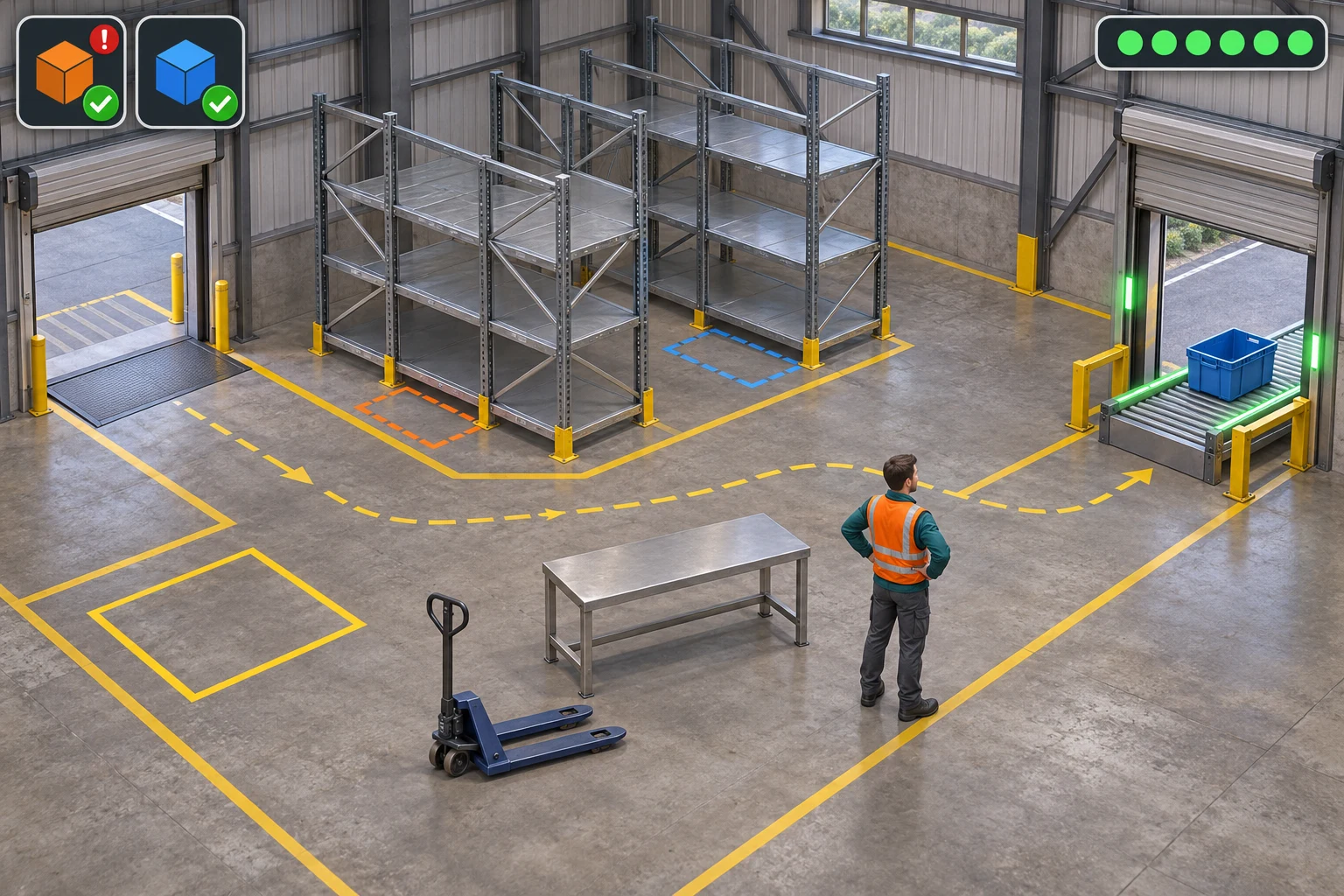
All rack bays, staging, and the order-tote position are empty in this pictured end state. The six progress pips are complete. The visual is a manually authored game concept that matches the paper trace, not evidence that a generated build dispatched either order.
Build and inspect the first version
Once the rules are clear, give a game-creation tool a bounded request rather than a vague instruction to “make a realistic warehouse.” For example, ask for one compact single-player warehouse shift with a dock, one staging slot, two one-unit rack bays, two order totes, a six-action clock, and icon-only feedback. Specify the state transitions and the blocked put-away behavior, then describe the one acceptance trace you will inspect.
Separate a design contract from a future build request and a validation checklist. The contract says which action changes which state. The build request describes the smallest scene and interactions. The checklist says what a person must actually observe later. This page does not claim to have sent those prompts to a model or generated a playable result; they are proposed handoff steps for a future attempt.
The current Free AI Game Maker page describes a general workflow: describe a game idea in plain English, review a playable 2D or 3D result, iterate in Workspace, and check displayed generation costs and account options. It does not document a warehouse-specific generator or guarantee the slotting rules above. If you use a creation workflow, inspect the actual result and compare it against the rule contract rather than assuming the game followed it.
For a later build, verify the sequence from the start state. Check that assigning the flex bay changes only its accepted SKU; Receive moves exactly one carton to staging; a blocked Put-away preserves the carton but consumes the fictional tick; a valid Put-away frees staging; Pick draws from the matching rack only; Dispatch requires a complete tote; and a tick-6 dispatch counts before the inclusive deadline closes. Then test restart and confirm that it restores the version’s initial assignment, stock, orders, tick, and score.
Revise one rule from observed behavior
When a real build eventually exists, record its first difference from the expected state. Write down the starting tick, bay assignment, carton location, selected action, expected next state, what the screen actually showed, and the evidence you observed. A report like “the warehouse feels confusing” does not identify whether the problem is the bay rule, a missing status cue, or the action schedule.
- Find the first mismatch. Compare the observation with the relevant transition row before changing the whole concept.
- Name one rule. Examples are the matching-bay precondition, the staging capacity, or the inclusive dispatch cutoff.
- Make one narrow repair. Keep stock, order needs, and deadlines fixed while you revise that rule or its feedback.
- Repeat affected checks. A staging change needs the blocked receive/put-away cases; a deadline change needs both schedule traces.
- Label evidence accurately. A paper trace predicts expected behavior. A prompt is only an instruction. A pass claim requires an actual observation from a real run.
If no build or run notes exist, leave every acceptance check unverified. Do not convert an authored simulation into a claim that a prompt improved a game. The manual example is still useful: it gives the next creator a baseline to compare with observed behavior and helps isolate the earliest wrong transition.
Start a warehouse game brief
A useful first warehouse prototype is a small operation the reader can reason about: one incoming carton, one storage decision, two orders, and a shift clock. The worked schedule suggests where to look first if a later implementation misses a deadline. It does not establish real warehouse practice, and it does not mean a game tool will generate the exact system.
To explore a general game-building workflow, try the Free AI game maker. Its published workflow describes plain-English prompts, a playable 2D or 3D first result that can be tested in the browser, and follow-up prompts for iteration. Before submitting, review the selected model, available Koin balance, and displayed generation cost. These are general product facts; the candidate blog path and its entry attribution remain local planning values until the route is confirmed.
Frequently asked questions
What should the first warehouse-management game include?
Begin with one shift, a small map, a few stock locations, clear order lines, and deadlines that fit the action clock. Make each receive, put-away, pick, and dispatch change one visible state. Add city economics, worker progression, or larger catalogs only after the first operational loop is easy to explain and inspect.
Why does the B carton need put-away before picking?
In the fictional rules here, an order can pick stock only from a rack bay assigned to that SKU. Receiving moves B from the dock to staging; it does not make B pickable. A successful put-away transfers the carton into the B bay and frees the single staging slot for later work.
Why does Version 0 miss the Standard deadline?
V0 leaves the flex bay unassigned. After B is received at tick 3, put-away is blocked at tick 4 and still consumes that action. Because picking from staging is prohibited, the B unit never reaches a pickable location before the six-tick shift closes, so Standard is late.
What changes in Version 1?
Only the pre-shift flex-bay assignment changes: it accepts SKU B. Rush still leaves at tick 2, and the B carton follows receive at tick 3, put-away at tick 4, pick at tick 5, and dispatch at tick 6. Both fictional orders then count on time under their inclusive deadlines.
Was this warehouse example generated or playtested?
No. Bluegate Fulfillment, its capacities, costs, deadlines, outcomes, and images are fictional instructional material. The V0 and V1 traces are hand-calculated from the stated rules. No prompt execution, generated playable build, warehouse data, software test, playtest, or measured result is claimed.