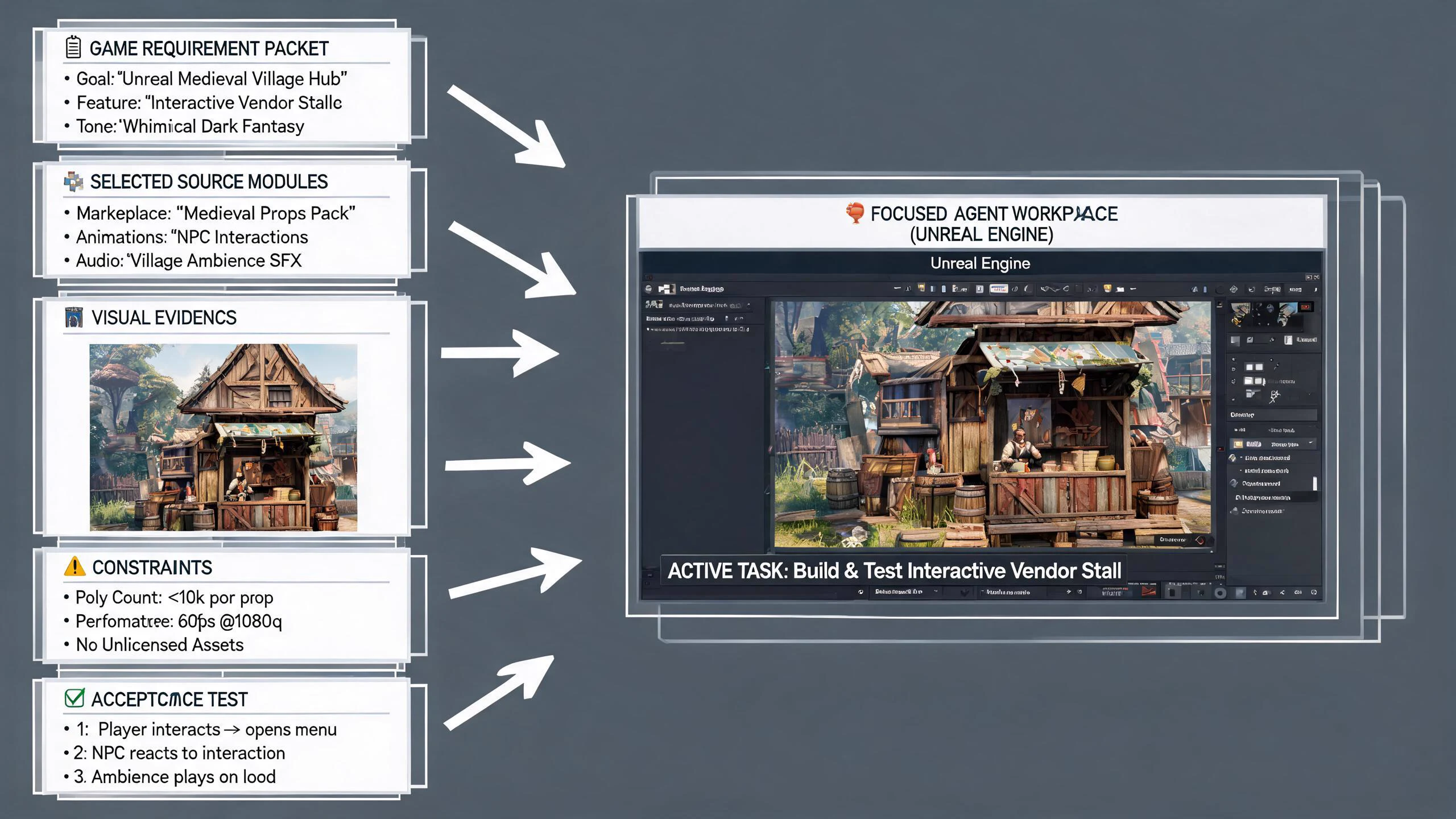
Prompting intent · curated evidence, constraints, and acceptance tests
Claude Opus 5 Prompting for Unreal Projects — the world's first online native Unreal workflow
Build focused Claude Opus 5 prompts for Unreal C++, Blueprints, logs, assets, and release tasks, then turn the approved brief into a native Unreal 5 project with SEELE AI.
Direct answer
A strong Opus 5 prompt for Unreal is a small evidence packet, not a repository dump. State the engine and project revision, player-visible goal, owning subsystem, exact files or Blueprint evidence, first failure, permitted tools, forbidden actions, output format, and native acceptance checks. Use SEELE AI when the desired result is a generated native Unreal 5 game project with browser preview and local download, rather than treating prompt quality as proof of a working game.
SEELE editorial concept created with Seedream 5.0. It is not an Anthropic or Epic asset, not a real Unreal Editor screenshot, not gameplay, and not proof of an official integration.
Start building an Unreal 5 game in SEELE
Choose a concrete prompt, open the SEELE Unreal creator, review the prefilled brief, and generate the native project. The first prompt is tailored to this page; the remaining prompts are reusable starting points.
Use this page's scoped brief
Create a native Unreal 5 night-market exploration game from this bounded context: third-person camera, one compact street, three interactable stalls, a missing lantern quest, one misleading clue, clear objective updates, completion, failure by timeout, and immediate restart. Use warm practical lighting, readable interaction feedback, keyboard and controller input, and a browser-preview route under five minutes.
Use Unreal Engine to generate a simple third-person tour game with mountains and water. Include responsive movement, a clear route, one completion state, failure recovery, immediate restart, browser preview, and a native downloadable Unreal 5 project.
Build a compact dungeon crawler using Unreal Engine. Include third-person movement, one combat loop, two connected rooms, one key-and-door objective, visible health and feedback, death, completion, immediate restart, browser preview, and a native downloadable Unreal 5 project. Test and regress the result.
Create a native Unreal 5 third-person city tour with a compact walkable district, vegetation, landmark lighting, and sunny, cloudy, and rainy weather states. Include clear controls, browser preview, stable restart behavior, packaging checks, and local project download.
An inspectable Unreal project rather than a model answer or an unofficial integration claim.
Browser preview
A fast way to check camera, controls, objective clarity, feedback, completion, failure, and restart before local continuation.
Optimization and packaging path
A workflow for performance review and package preparation before external distribution.
Downloadable project
A local project handoff for source, Blueprint, asset, plugin, rights, build, target-device, and release review.
What is verified—and what it means for Unreal
Context quality beats context volume
Include the smallest set of source, graph, log, screenshot, configuration, and target facts that can distinguish correct ownership from a plausible guess. Label omitted context and uncertain assumptions.
Prompt structure should mirror verification
Put the observed state, desired state, authority boundary, requested artifact, and falsifiable acceptance checks in separate sections so the response can be reviewed against the same contract.
Blueprint evidence needs semantics
A screenshot alone omits parent behavior, defaults, types, authority, latent actions, collapsed graphs, macros, and disconnected pins. Add node text and state transitions.
Creation is a separate handoff
Once the player loop and constraints are approved, SEELE can generate the native Unreal project, expose a browser preview, and provide a path to optimization, packaging, and download.
A five-stage prompting and context engineering for Unreal workflow
Start with the player-visible outcome
Write one sentence describing what the player can do and how success or failure becomes observable. Tie the request to a map, actor, component, subsystem, Blueprint, module, or build target rather than asking for a generic Unreal solution.
Attach a curated evidence packet
Provide engine version, commit, plugin list, relevant file excerpts, Blueprint node text, logs from the first failure, reproduction steps, screenshots, configuration, and known-good behavior. Remove secrets, licensed assets, and unrelated source.
Declare tools and authority
List read, search, edit, build, editor, network, publish, and destructive permissions separately. Require approval before broad writes, dependency changes, asset replacement, packaging, publishing, or external communication.
Demand a reviewable output
Ask for observed facts, assumptions, root-cause hypothesis, affected owner, minimal plan, exact proposed changes, risks, tests, rollback, and unanswered questions. Reject invented engine APIs or evidence-free certainty.
Validate and hand off to creation
Run the real C++, Blueprint, runtime, reopen, cook, package, and target checks. If the goal is a new playable slice, convert the accepted design into a focused SEELE prompt, generate the native Unreal 5 project, inspect the browser preview, and download or continue production.
Failure modes to block before adoption
Risk 1
A full repository dump can hide the actual owner, exceed useful attention, expose private code, and make the result impossible to audit.
Risk 2
Prompt examples copied across Unreal versions can preserve obsolete APIs, modules, build rules, input systems, or packaging assumptions.
Risk 3
Blueprint screenshots without types, defaults, parent behavior, and authority can produce a confident plan for a graph that does not exist.
Risk 4
A beautifully structured response is still only a proposal until the real project compiles, runs, reopens, cooks, packages, and passes the target checks.
Decision scorecard
Dimension
What good looks like
Evidence to keep
Relevance
Every supplied artifact can change the diagnosis or implementation decision
Context manifest with inclusion reason and redaction record
Ownership
The prompt identifies the likely module, asset, graph, target, and state boundary
Repository and runtime trace against a known-correct owner
Reviewability
Facts, assumptions, changes, tests, and rollback are separable
Structured response and minimal diff review
Native proof
Acceptance is decided by Unreal and target behavior
Compile, automation, reopen, cook, package, device, and player-path results
Unreal implementation notes for this decision
Create a context manifest
List every included file, excerpt, graph, screenshot, log, configuration, and document with its revision, purpose, and sensitivity. This makes stale evidence, missing ownership, accidental secrets, and irrelevant bulk visible before the model sees them.
Write acceptance checks before the request
Define compile targets, Blueprint assets, maps, runtime path, invalid inputs, networking role, restart, save or load, cook, package, device, and performance checks first. The desired response can then be constrained to evidence that those checks can falsify.
Use retrieval with stop conditions
Allow targeted search for named symbols, owners, callers, asset references, or the first error, but cap scope and require a reason for each expansion. Stop when evidence is missing rather than filling gaps with an engine-general answer.
From evaluated idea to a SEELE native Unreal project
Use the model research to tighten the brief, not to replace project evidence. The direct creation path is deliberately short and observable:
1. Bound the player loop
Keep one camera, one primary verb, one objective chain, explicit failure and completion, restart behavior, visual direction, controls, target session length, and a clear cut list.
2. Generate in SEELE
Open the canonical Unreal creator, choose the closest verified starter world, submit the brief, and generate a native Unreal 5 project rather than treating a text answer as the deliverable.
3. Inspect the browser preview
Play the result from start through success, failure, and restart. Check camera, input, objective clarity, feedback, interaction state, visual hierarchy, and obvious performance or stability problems.
4. Download or continue production
Review the project, source, Blueprints, assets, plugins, rights, configuration, performance, saves, networking, cook, package, and target requirements before local continuation or external release.
Starter creation brief
Create a native Unreal 5 night-market exploration game from this bounded context: third-person camera, one compact street, three interactable stalls, a missing lantern quest, one misleading clue, clear objective updates, completion, failure by timeout, and immediate restart. Use warm practical lighting, readable interaction feedback, keyboard and controller input, and a browser-preview route under five minutes.
Official evidence and capability boundary
Snapshot date: July 25, 2026. Anthropic's July 24, 2026 announcement is the first-party source for release status, pricing, positioning, and launch availability. It does not claim an Epic-supported Unreal integration. Epic documentation and the exact project remain authoritative for engine behavior, compilation, assets, tests, cooking, packaging, and target-platform results.
Anthropic release
Release date, claude-opus-5 model ID, coding and agent positioning, pricing, Fast mode, alignment, safety, and availability.
Continue through the Claude Opus 5 × Unreal cluster
Claude Opus 5 Computer Use in Unreal Editor
Evaluate Claude Opus 5 computer use around Unreal Editor with bounded permissions, visual-state checks, save and package gates, audit trails, recovery, and a SEELE creation handoff.
Move from Claude Opus 5 game ideas and specifications to a native Unreal 5 project in SEELE AI, with browser preview, validation, packaging, and download checkpoints.
Plan a Claude Opus 5, Claude Code, and MCP workflow for Unreal with honest integration boundaries, least privilege, exact tools, review gates, native validation, and SEELE handoff.
Include engine version, project revision, player-visible goal, owner, exact evidence, first failure, permissions, requested output, acceptance checks, and rollback.
Should I send the whole Unreal repository?
Usually no. Start with a curated evidence packet and allow targeted retrieval. Broad context increases privacy risk and can make ownership reasoning less precise.
How do I prompt with Blueprint evidence?
Provide node text, types, defaults, parent class, interfaces, event order, authority, inputs, outputs, state transitions, and focused screenshots.
Can a better prompt guarantee working Unreal code?
No. Prompting improves the proposal, but only the real toolchain, runtime, asset checks, packaging, and target tests prove the result.
How does the prompt move into SEELE?
Reduce the approved design to the player loop, setting, camera, controls, objective, failure, completion, visual direction, and acceptance checks, then use that as the native Unreal creation brief.
How do I know the context packet is complete?
It is complete enough when a reviewer can identify the owner, reproduce the issue or goal, distinguish likely alternatives, understand permissions, and run the stated native acceptance checks.
Turn the research into a native Unreal 5 game
Open the canonical SEELE Unreal creator, choose a verified starter world, generate the native project, inspect the browser preview, then download or continue optimization and packaging. Keep third-party model evaluation and project evidence separate.