
Use a self-contained moment
Make the clip work without a long intro.

Plan a social video cut with one message, platform format, and review owner. Draft a short social video sequence around one message and a chosen channel. Check aspect ratio, captions, source rights, and destination link with the publishing team.
Partners and teams

















How it works
Start with a quest idea, build it in SEELE, and play it through from start to finish.

A miller asks for help. The player heads into the forest, finds a crystal, and brings it back for a reward.
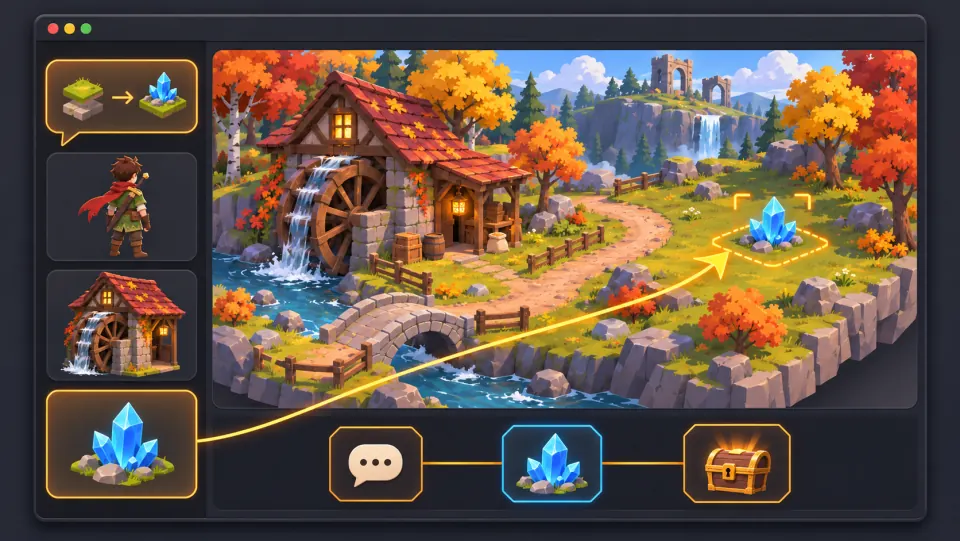
Ask seeleAgent to create the village and forest, add the miller and the crystal, and set up the dialogue, pickup, and reward.
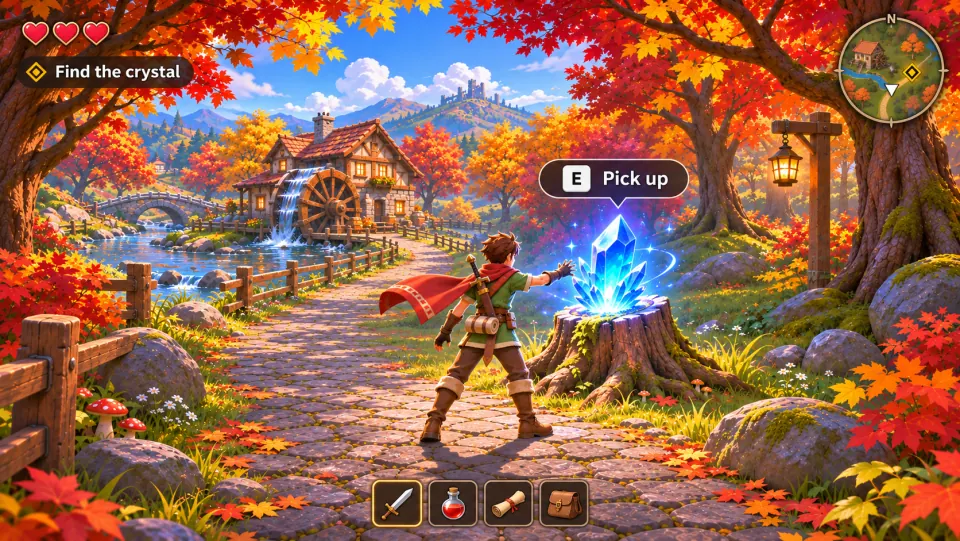
Take the quest, press E to pick up the crystal, and bring it back to the miller to claim your reward.
Make a game for freePick a starting point
The opening is understandable on its own.
Pick a six-second clip of a paper sculpture unfolding into a bird. Confirm the footage is cleared and the transformation reads without preceding context.
 Source moment ↗
Why SEELE
Make the clip work without a long intro.

Protect the main action and captions.

Keep the message available without audio.

Avoid unapproved promotions or personal data requests.

Check format, moderation, and destination.

Record approval for footage, music, and graphics.
Made with SEELE
These games are playable. Pick one and give it a try.
 AdventureAdventure GamePlay the example ↗
 ShooterWarcom: Neon BreachPlay the example ↗
 ActionOld Gods RunPlay the example ↗
 CasualCaution! Egg on the Car RoofPlay the example ↗
 RunnerNeon Night Rush: Barrier DashPlay the example ↗
 PuzzleMuseum ExhibitionPlay the example ↗
 SimulationMilky Way Idle 3DPlay the example ↗
 CasualSnowfall & Starry GiftsPlay the example ↗
 RPGCrownfall-The-Three-Realms-CoverPlay the example ↗
 SimulationFLYING CARPlay the example ↗
Who it’s for
Set the audience, message, and destination for an idea in the Seele AI Video for Social Media Teams workflow. Check current model options, clip limits, exports, and cost before production.
SEELE AI Video for Game Marketing ↗
Write a short brief for the intended channel and viewer, then verify the current workflow and output limits before scheduling a release.
SEELE AI Video for Animation Studios ↗
Compare a draft with the project brief and rights requirements; confirm available editing and delivery steps in the current product.
World Cup Team Star Cheer Video Game Generator ↗Reviews
FAQ
Plan a social video around one message, an opening moment, and the action viewers should take. Check captions, framing, length, and sound for each destination instead of assuming one cut fits every platform.
Provide the audience, communication goal, subject, action, camera direction, environment, lighting, mood, aspect ratio, duration, and any approved references. Explain what each reference controls and what must not be copied. Those constraints make the first draft easier to judge and later revisions more focused.
For Seele AI Video for Social Media Teams, start with source moment. Define the intended audience and one measurable outcome, then review the first version against the brief.
Before a first Seele AI Video for Social Media Teams project, define the task, intended audience, one visible outcome, and a constraint. Use Source moment as a direction that fits the brief.
To get started with Seele AI Video for Social Media Teams, use Describe the job as the first step. Set one goal, audience, and constraint; test a small version, then change one thing at a time.
For Seele AI Video for Social Media Teams, name the intended user, one action, and a visible outcome. Use Source moment as a starting direction and add one requirement from its example prompt.
Ask someone who matches the intended player or viewer for Seele AI Video for Social Media Teams to test its main action. Note where the brief is unclear, then revise once before adding features.
For Seele AI Video for Social Media Teams, try Source moment first. Define the action, outcome, and one constraint, then compare another direction only if the first misses the brief.
Check the Seele AI Video for Social Media Teams result against the brief, intended behavior, and first workflow step. Record one mismatch and test that change before expanding scope.
Scope a first Seele AI Video for Social Media Teams prototype to Source moment, one user action, and one visible outcome. Defer secondary features until that path works.
Compare Source moment and Pacing and sequence for Seele AI Video for Social Media Teams using the same user action and visible outcome. Choose the direction that fits the brief with fewer assumptions.
After reviewing Seele AI Video for Social Media Teams, record one gap between the brief and result. Make one focused change, then test the same action against the original outcome.
Match a linked tool's input and output to one need in the Seele AI Video for Social Media Teams brief. If it does not support that step, skip it and keep the test in the main project.