
Seele AI · Create
Game UI Design
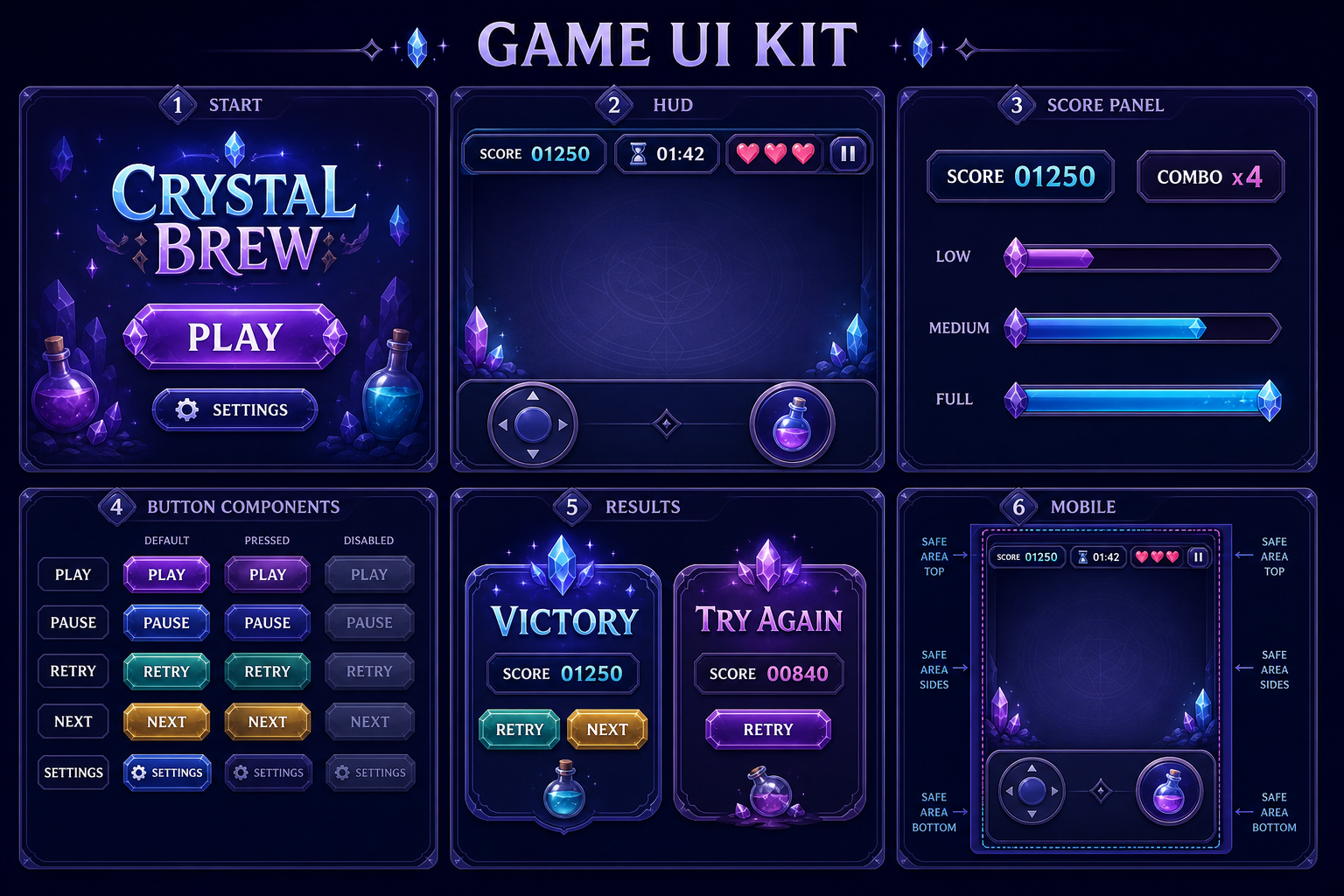
Design UI screens and HUDs for playable mini games.
Use this Game UI Design workflow to draft a consistent mini game UI kit covering the start screen, HUD, score panel, buttons, result states, and mobile layout.

The working loop
Design The Interface In Three Passes
Move from screen requirements to a coherent kit, then test every state against a mini game flow.
Define Screens And Signals
Describe the game loop, score or progress model, target device, required screens, and the information players need during play. Seele organizes the request into screen, HUD, component, state, and responsive-layout requirements.
Generate The UI Kit
Run the prompt with a concrete genre, art direction, and mobile constraints. Seele drafts a coordinated start screen, HUD, score panel, buttons, result states, and mobile layout direction.
Review In A Playable Flow
Check readability, touch targets, state transitions, score feedback, accessibility, and safe areas in a working prototype. Seele can revise the design direction from specific feedback while the developer validates behavior in the actual build.
What leaves the page
UI Artifacts You Can Review
Each output helps align the mini game interface while keeping implementation and playability claims separate.
Screen Set
A coordinated start screen, gameplay HUD, pause state, and success or failure result screen.
HUD And Component System
Score, progress, status indicators, primary buttons, secondary controls, and their key states.
Mobile Layout Notes
Safe-area, touch-target, hierarchy, portrait or landscape, and responsive-behavior guidance.
Fit and limits
Treat The Kit As Design Direction
Best for
- Scoping the required screens and HUD signals for a mini game
- Comparing visual hierarchy and component states before implementation
- Aligning designers and developers around a mobile-friendly first pass
Still needs human review
- Validate behavior, scoring, transitions, and playability in a functioning prototype
- Review accessibility, localization, device safe areas, touch targets, and responsive breakpoints
- Confirm asset rights, brand fit, technical feasibility, performance, and final visual quality before release
Before you start
FAQ
What should a mini game UI kit include?
A practical first-pass kit usually includes a start screen, the in-game HUD, score and progress states, primary and secondary buttons, pause or settings controls, success and failure result screens, and mobile-safe variations. Keep component names and interaction states consistent so reviewers can compare screens quickly.
How do I make a HUD readable on mobile?
Prioritize the few values a player needs during play, reserve safe areas around notches and touch controls, use clear contrast, and test at the smallest supported viewport. Check that labels, icons, score changes, and button states remain legible without covering the action.
Can the generated UI be used without review?
No. Treat it as a design draft. A designer and developer should validate interaction states, accessibility, localization, platform safe areas, asset rights, responsive behavior, and implementation feasibility before shipping.
Does the visual reference prove the mini game is playable?
No. The visual reference communicates an art direction only. Validate the actual HUD behavior, scoring logic, touch targets, transitions, and result states in a functioning prototype before release.
Next move
Build Game UI Design faster in Seele AI
Turn a rough creation goal into a clearer prompt, direction, and next step inside Seele AI.